Introduction
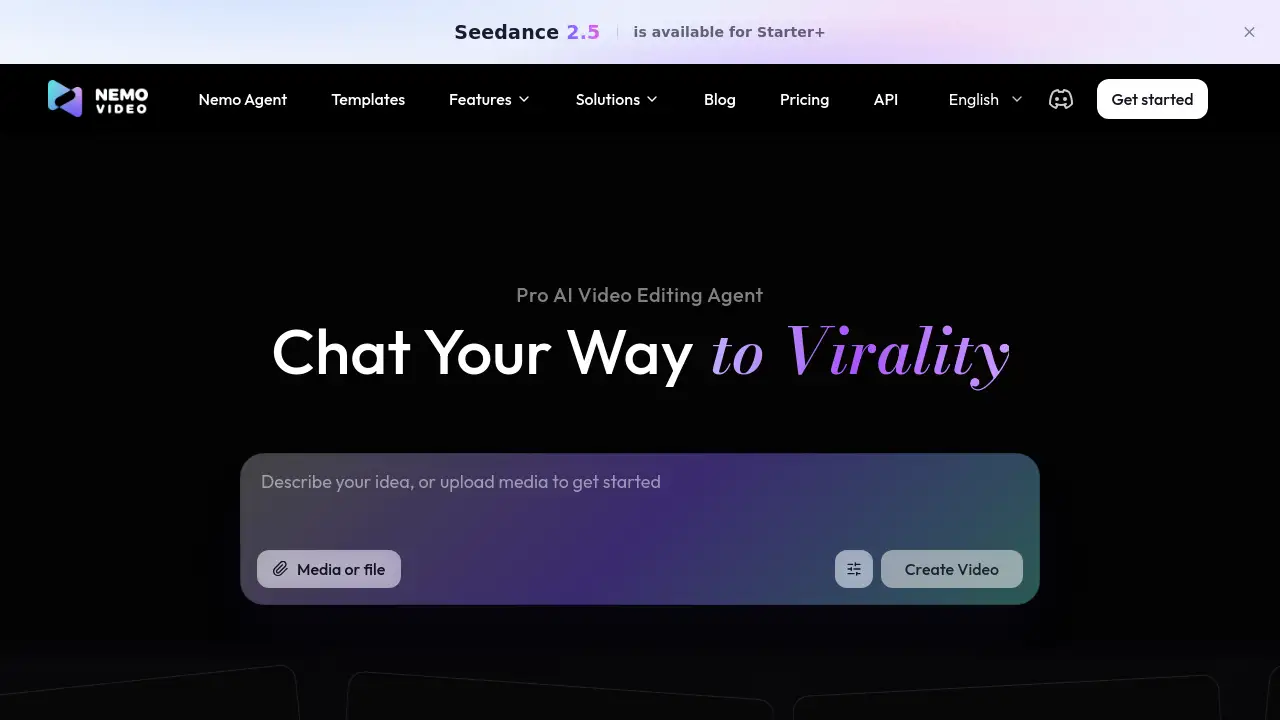
Nemovideo is an AI video editing agent that lets users chat their way to finished videos. Instead of learning complex timelines, creators can describe an idea, upload media, and let the agent hunt viral videos, analyze trends, and create ready-to-go content in minutes. This review covers features, use cases, pricing, pros and cons, and common questions about this AI video editor.
What is Nemovideo?
Nemovideo is a chat-based AI video editing agent designed to simplify video production. It solves the problem of slow, technical editing by turning simple prompts into edited videos, captions, voiceovers, and social-ready clips. Users can type what they want, upload media, or start with a viral template, and the agent handles much of the dirty work. The platform is suitable for content creators, affiliate marketers, e-commerce sellers, freelancers, and solo marketers. As an AI video editor, it matters because short-form video moves fast, and many creators need consistent output without hiring a full editing team. Nemovideo also offers a template gallery, AI audio tools, caption tools, and a talking-head video editor, making it more than a basic video generator. It is a practical AI video editing agent for people who want to publish more often.
Key Features of Nemovideo
Chat-Based AI Video Editing Agent
Describe an idea or upload a file, then chat with the AI video editing agent to shape the final cut. This feature removes the need to learn timelines, keyframes, or advanced editing software.
Viral+ Studio
Use Viral+ Studio to hunt viral videos, analyze trends, and create ready-to-go content. It helps turn trend research into video ideas that match current short-form formats.
Inspiration Center
The Inspiration Center focuses on viral video hooks and creative angles. Creators can study what works and apply those ideas to their own AI video content creation.
SmartAudio
SmartAudio supports AI audio editing, voiceovers, pacing control, and music workflows. The homepage references Qwen3 TTS for voiceovers and MiniMax Music 3 for short-video music edits.
Smart Caption
Smart Caption is an AI caption generator that helps add, align, and clean up captions for social videos. Captions can improve accessibility and watch time on TikTok, Reels, and Shorts.
Talking-Head Video Editor
The talking-head video editor helps polish presenter-led clips. It can support creators who record themselves and want faster cleanup, captions, and audio improvements.
SmartPick
SmartPick acts as an AI rough-cut tool. It helps select usable moments from longer footage so the AI video editing agent can build a first draft faster.
Templates and Multi-Language Support
Nemovideo offers a template gallery with travel, commercial, classic, TVC, and flow edit styles, plus many language options. Templates give new users a faster starting point.
Use Cases for Nemovideo
Content Creators
Content creators can use Nemovideo to turn ideas into short videos for TikTok, Reels, and Shorts. The AI video editing agent helps maintain a steady posting schedule without a complex editing setup.
Affiliate Creators
Affiliate creators can use the AI video editor to make product-focused clips, analyze trends, and test multiple hooks. Viral templates and Smart Caption can speed up campaign production.
E-commerce
E-commerce sellers can create product demos, promos, and social ads with less manual editing. The platform's AI video content creation tools can help small teams produce more variations.
Marketers
Solo marketers and small marketing teams can use Nemovideo as a video editing agent for campaigns. It can support rapid concept testing, captions, voiceovers, and platform-ready exports.
Freelance Editors
Freelance editors can use SmartPick, SmartAudio, and Smart Caption to finish rough cuts faster. They can also use the AI video editing agent for client drafts and repetitive production tasks.
How to Use Nemovideo
- Sign up for Nemovideo and start with the free option. The homepage says no credit card is required.
- Describe your idea in the chat, or upload media such as clips, images, or audio.
- Ask the AI video editing agent to create a video, apply a template, or follow a viral style.
- Use features like Smart Caption, SmartAudio, SmartPick, or the talking-head video editor to refine the result.
- Review the output, make any needed changes, and export for platforms such as TikTok, Reels, or Shorts.
Target Audience for Nemovideo
- Content creators who post short-form video regularly.
- Affiliate creators who need faster product video production.
- E-commerce sellers who want product promos and social ads.
- Solo marketers and small marketing teams.
- Freelance video editors who want AI help with rough cuts and repetitive work.
- Anyone seeking an AI video editing agent without advanced editing skills.
Is Nemovideo Free?
Nemovideo offers a free starting option, and the homepage states that no credit card is required. Specific paid plan prices are not fully listed in the reference information. Seedance 2.5 is noted as available for Starter+, which suggests a paid tier. For exact pricing, users should visit the official Nemovideo pricing page.
| Plan | Price | Features |
|---|---|---|
| Free | $0 | Start free, no credit card required, basic access to the AI video editing agent |
| Starter+ | Check official pricing page | Seedance 2.5 availability and expanded features |
| Other paid plans | Check official pricing page | Additional limits, features, and usage options |
Nemovideo's Pros and Cons
| Aspect | Pros | Cons |
|---|---|---|
| Pricing | Free start with no credit card required | Full pricing details are not shown in the reference |
| Features | Chat-based AI video editing agent, viral templates, Smart Audio, Smart Caption, SmartPick | Advanced features may require a paid plan |
| Ease of use | No editing skills required; prompt-based workflow | AI output may still need human review |
| Use cases | Supports creators, affiliates, e-commerce, marketers, and freelance editors | Some workflows may work better on desktop |
| Content creation | Helps hunt trends and create ready-to-go content | Results depend on user input and platform trends |
Frequently Asked Questions about Nemovideo
What is Nemovideo?
Nemovideo is an AI video editing agent that lets users chat their way to edited videos. It combines trend research, templates, captions, audio tools, and video generation in one platform.
Is Nemovideo free to use?
Yes, Nemovideo offers a free starting option with no credit card required according to the homepage. Paid plans are available, and users should check the official pricing page for current details.
Do I need video editing skills to use Nemovideo?
No. The platform is built so users can describe what they want and let the AI video editor handle the editing process. Basic creative direction is still useful for better results.
Can Nemovideo help create viral videos?
Nemovideo includes Viral+ Studio, Inspiration Center, and viral templates. These tools help users hunt viral videos, analyze trends, and create ready-to-go content, though no tool can guarantee virality.
What kind of videos can I make with Nemovideo?
Users can make short-form social videos, talking-head clips, product promos, affiliate content, and template-based edits. The AI video editing agent supports captions, voiceovers, music, and rough cuts.
Does Nemovideo support captions and voiceovers?
Yes. Smart Caption provides AI caption generation, while SmartAudio supports AI audio editing and voiceover workflows. The homepage also mentions Qwen3 TTS and MiniMax Music 3.
Nemovideo Tags
AI video editing agent, Nemovideo, AI video editor, chat-based video editing, viral video generator, AI video content creation, talking-head video editor, Smart Caption, SmartAudio, SmartPick, viral templates, video editing agent