Introduction
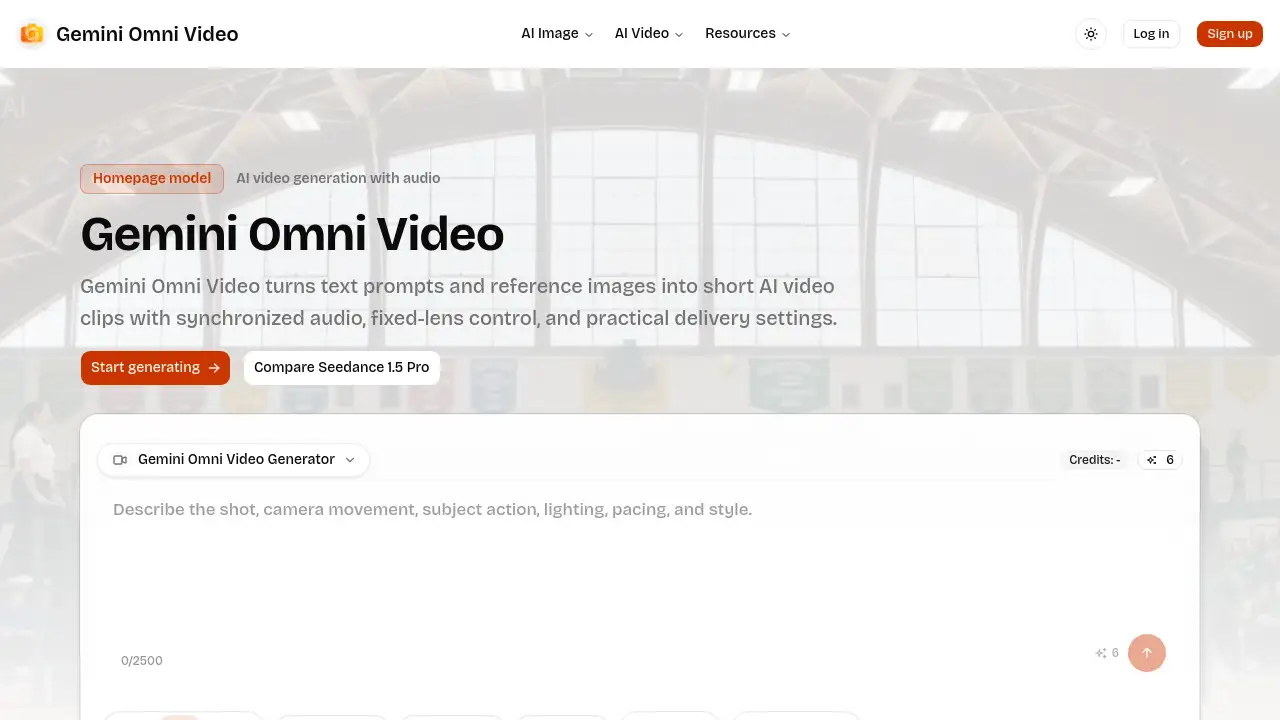
Gemini Omni Video is an AI-powered video generator designed to create short, production-ready clips from text or images.
What is Gemini Omni Video?
Gemini Omni Video is an AI video generator that transforms text prompts or uploaded images into short video clips. It solves the problem of quickly creating professional-looking video content without extensive production resources. This tool is particularly suitable for marketers, content creators, and teams needing to produce consistent, brief video assets for social media, product demos, or internal presentations. Its importance lies in offering a streamlined workflow with control over key creative elements like aspect ratio, duration, and audio synchronization, making AI video creation more practical and predictable for commercial use. This makes Gemini Omni Video a valuable tool for anyone looking to integrate AI video generation into their content strategy efficiently.
Key Features of Gemini Omni Video
Text-to-Video and Image-to-Video Input
Users can start the AI video generation process either from a descriptive text prompt for open concepts or by uploading an image to add controlled motion to a specific visual reference.
Multiple Resolution Choices
The tool allows users to select output quality by offering 480p, 720p, or 1080p resolution settings, providing flexibility to match video quality with project needs and budget constraints.
Flexible Video Duration Options
Creators can generate short-form video clips in set durations of 4, 8, or 12 seconds, catering to different storytelling beats and platform requirements for social media content.
Synchronized Audio Generation
Gemini Omni Video can automatically generate synchronized audio for clips, adding atmosphere, action, or narrative strength to create more complete and engaging short-form videos.
Six Supported Aspect Ratios
The platform supports a variety of formats including square (1:1), portrait (3:4, 9:16), landscape (4:3, 16:9), and cinematic (21:9), ensuring videos are optimized for any channel or platform.
Fixed-Lens Camera Stability
A fixed-lens mode option locks the camera perspective, providing stable shots ideal for product showcases, app demos, or any scene where excessive camera movement would be distracting.
Use Cases for Gemini Omni Video
Social Media Content Creation
Marketers can quickly produce vertical or square format video clips with synchronized audio, perfectly tailored for platforms like Instagram Reels, TikTok, or YouTube Shorts.
Product Demo and Showcase Videos
E-commerce teams and product marketers can use the image-to-video feature and fixed-lens mode to create stable, clean video presentations of their products from a single photo.
Storyboard and Concept Visualization
Creative teams can turn simple text descriptions or sketched images into short video sequences, helping visualize concepts for ads, presentations, or internal reviews before full production.
Ambient Video Backgrounds
Content creators can generate short, looping video clips with ambient audio for use as website backgrounds, in digital signage, or during live stream intermissions.
How to Use Gemini Omni Video
- Choose Your Input Mode: Begin by selecting whether to create a video from a text prompt (text-to-video) or by uploading an existing image as a reference (image-to-video).
- Set Your Delivery Format: Before generation, define the output specifications by choosing your desired aspect ratio, resolution (480p, 720p, or 1080p), and clip duration (4, 8, or 12 seconds).
- Configure Audio and Stability: Decide if your scene needs synchronized audio and enable it. For stable shots, activate the fixed-lens mode to minimize camera movement.
- Craft Your Prompt: Write a clear, descriptive prompt detailing the scene, subject, and desired action. If using an image, the prompt should focus on the motion you want to add.
- Generate and Review: Initiate the AI video generation. Once complete, review the Gemini Omni Video clip and use the settings to make adjustments and create variations if needed.
Target Audience for Gemini Omni Video
- Social Media Managers and Content Creators
- Digital Marketing Agencies and Teams
- E-commerce Store Owners and Product Marketers
- Startup Founders and Solopreneurs
- Creative Teams and Video Editors
- Educators and Trainers creating digital content
Is Gemini Omni Video Free?
Specific pricing details for Gemini Omni Video are not explicitly listed on the provided homepage. The platform operates on a credit-based system for rendering final clips. Users are directed to set their delivery format and review settings before spending credits, suggesting a pay-per-generation or subscription model. For the most accurate and current pricing, including any free trial or credit offers, users should visit the official Gemini Omni Video website.
Gemini Omni Video's Pros and Cons
| Aspect | Pros | Cons |
|---|---|---|
| Workflow | Streamlined, homepage-ready interface with all key controls visible before generation. | May lack the depth of advanced editing tools found in full video editing suites. |
| Control | Offers practical controls over aspect ratio, resolution, duration, audio, and camera stability. | Output duration is limited to short clips (max 12 seconds), not suitable for long-form content. |
| Accessibility | Simplifies AI video generation, making it accessible to non-experts for quick content creation. | Effectiveness heavily relies on the user's ability to craft effective text prompts. |
| Output | Generates production-ready clips suitable for direct use on social media and marketing channels. | Pricing structure is not transparent on the homepage, requiring a visit to the official site for details. |
Frequently Asked Questions about Gemini Omni Video
What is Gemini Omni Video?
Gemini Omni Video is an AI-powered video generator that creates short video clips from text descriptions or uploaded images. It includes controls for aspect ratio, resolution, duration, and optional synchronized audio, providing a production-ready workflow for creating social media clips, product demos, and more.
Can Gemini Omni Video generate audio?
Yes, Gemini Omni Video can generate synchronized audio for its video clips. This feature adds ambient sound, action effects, or musical elements, which is particularly useful for creating more immersive and complete short-form storytelling videos.
Which aspect ratios does Gemini Omni Video support?
Gemini Omni Video supports six different aspect ratios: 1:1 (square), 4:3, 3:4, 16:9, 9:16 (vertical), and 21:9 (cinematic). This range covers most social media, web, and presentation formats.
How long can Gemini Omni Video clips be?
The Gemini Omni Video workflow currently allows users to generate clips with fixed durations of 4 seconds, 8 seconds, or 12 seconds, making it ideal for short-form video content.
When should I use the fixed-lens mode?
The fixed-lens mode in Gemini Omni Video should be used when you need a stable, non-moving camera shot. This is ideal for product showcases, app interface demos, character shots, or any scene where the focus should remain squarely on the subject without cinematic camera movement.
What is the best way to plan a Gemini Omni Video project?
For reliable results, first decide between text-to-video or image-to-video input based on your creative starting point. Then, define your delivery format (aspect ratio, resolution, duration) and decide on audio and camera stability needs before writing your final prompt and generating the clip.
Gemini Omni Video Tags
Gemini Omni Video, AI video generator, text to video, image to video, synchronized audio, short-form video, social media video maker, video aspect ratio control, AI video workflow, fixed-lens video, video resolution settings, production-ready AI video