Introduction
AI Movie Maker is an online tool that helps people turn text, images, and scripts into short films. It uses OpenArt AI and other leading video models inside one connected workflow. With AI Movie Maker, users can build multi-shot stories, keep faces and outfits consistent, add voice or sound, and refine scenes online without opening another editor. The product is designed for creators who want a simple path from a written idea to a finished AI video. This review covers what the product does, its key features, likely use cases, pricing, and the main strengths and drawbacks of using this AI Movie Maker.
What is AI Movie Maker?
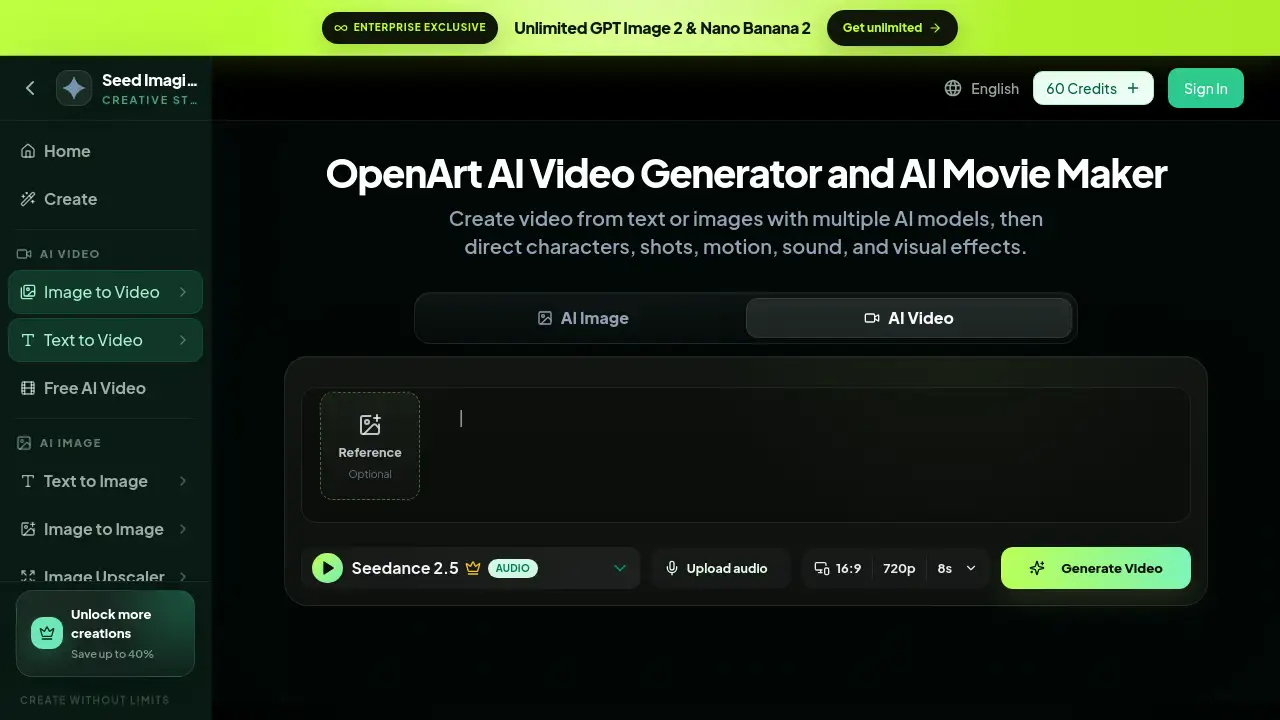
AI Movie Maker is a web-based video creation platform available at SeedImagine. It combines several AI models in one place, including OpenArt AI, so users can generate video from text prompts or reference images. The main goal is to solve a common problem: most AI video tools only create a single clip. This product connects scenes, characters, motion, and sound into a longer story. It is suitable for filmmakers, marketers, educators, and social media creators who need fast video drafts or polished short films. An AI movie maker matters because it reduces the need for complex editing software and lets one person manage the whole video workflow from prompt to final edit.
Key Features of AI Movie Maker
Multi-Model Video Generation
AI Movie Maker allows users to choose from multiple AI video models. OpenArt AI is one of the available options, and different models suit different needs, such as fast drafts, cinematic quality, realistic motion, or unique styles.
Multi-Shot Story Building
Instead of making one isolated clip, users can build multi-shot stories. The AI Movie Maker workflow divides a longer idea into directed scenes, which makes it easier to create a complete video with a beginning, middle, and end.
Consistent Character Controls
Characters can be saved and reused across scenes. This AI movie maker includes tools that keep face, clothing, and identity connected, so the cast does not change between shots.
Motion Sync and Lip Sync
Users can direct body movement and spoken performance with an OpenArt AI video model. Motion Sync transfers gestures and posture from a reference video, while Lip Sync aligns mouth movement with dialogue or a voiceover.
Native Audio and Sound
Sound can be added inside the same OpenArt AI video workflow. Users can upload audio, create voiceover, or let the AI video generator add appropriate sound to a scene without switching to a separate audio editor.
VFX and Conversational Editing
After the first generation, the AI Movie Maker supports VFX, restyling, extension, background changes, lighting adjustments, and conversational edits. This means users can describe a change in plain language and refine the video online.
Use Cases for AI Movie Maker
Short Storytelling and Indie Films
An AI movie maker is useful for creators who want to test a film idea quickly. They can turn a script into animated scenes, preview pacing, and share a visual draft before investing in production.
Marketing and Product Demos
Marketers can use OpenArt AI to create product videos from simple prompts or images. This AI video generator can turn a feature description into a short demo, explainer, or advertisement.
Social Media Content
For platforms like YouTube, TikTok, and Instagram, creators need fast video ideas. AI Movie Maker helps produce text-to-video clips with sound, character consistency, and special effects, all in one session.
Education and Training
Teachers and trainers can create visual lessons or scenario-based videos. The multi-shot story tool helps explain processes, historical events, or fictional examples without needing a production team.
Concept Visualization
Designers and architects can animate still images to show how a space, product, or character might move. Image-to-video workflows in this AI movie maker make it simple to bring concepts to life.
How to Use AI Movie Maker
Using the AI Movie Maker is straightforward. The product page lists four main steps for creating OpenArt AI videos:
- Start with text, an image, or a script. Write the first scene, upload a visual reference, or bring a longer story idea that OpenArt AI can divide into directed video moments.
- Select the model and shot direction. Choose an available AI video model, then define subject action, camera movement, visual style, timing, and audio requirements.
- Build the scene and maintain the cast. Generate the first result, save characters, and use shot controls to compare identity, motion, and composition.
- Add performance, sound, and final edits. Apply Motion Sync, Lip Sync, native audio, VFX, restyling, extension, or conversational edits to complete the video.
This workflow lets users create OpenArt AI videos from text and images in a logical sequence, then refine them online.
Target Audience for AI Movie Maker
- Content Creators and YouTubers
- Social Media Marketers
- Filmmakers and Storyboard Artists
- E-commerce and Product Teams
- Educators and Trainers
- Game Designers and Concept Artists
- Small Business Owners
Is AI Movie Maker Free?
The exact pricing table is not listed on the product page in detail. The website shows a credit-based system for OpenArt AI video generation. A user can sign in and receive 60 Credits, while a single video generation requires 280 Credits. This AI movie maker offers paid plans through the official pricing page, and the homepage mentions plans that offer unlimited access and savings up to 40%.
| Plan | Price | Features |
|---|---|---|
| Sign-in Credits | $0 | 60 Credits shown for new users; pay as you go |
| Paid Plans | See official pricing page | Higher credit limits, unlimited options, discounted annual plans |
To check current pricing and limits, visit the official SeedImagine pricing page.
AI Movie Maker's Pros and Cons
| Aspect | Pros | Cons |
|---|---|---|
| Pricing | Credit system offers flexibility; sign-in credits let users test quickly | A single video uses 280 Credits, so costs can rise |
| Features | Multi-model support, character consistency, Motion Sync, Lip Sync, VFX | Feature-rich workflow may feel complex for beginners |
| Workflow | All-in-one online editing from text to final video | Requires prompt planning and character setup for best results |
| Audience | Suitable for creators, marketers, educators, and indie filmmakers | Not a substitute for professional post-production tools |
This table gives a balanced view of this AI movie maker. Some users may find the credit cost a concern, but the range of tools is strong for an online video generator.
Frequently Asked Questions about AI Movie Maker
What is AI Movie Maker?
AI Movie Maker is an online video creation platform that lets users generate OpenArt AI videos from text, images, and scripts. It connects multiple AI models with character, motion, sound, and editing tools in one workflow.
Can I create OpenArt AI videos from text?
Yes. Text-to-video is a core feature. Users write a scene description, choose a video model, and the AI movie maker generates a moving image with optional sound and effects.
Can I keep characters consistent across scenes?
Yes. This AI Movie Maker includes saved character controls. Users can reuse the same face, clothing, and identity in different shots, which helps build multi-shot stories with a stable cast.
Does AI Movie Maker support sound and lip sync?
Yes. The tool supports native audio, uploaded audio, Motion Sync, and Lip Sync. That allows users to add dialogue, voiceover, gestures, and mouth movement to OpenArt AI videos.
Is AI Movie Maker free?
There is no confirmed fully free plan. The platform gives sign-in credits, and video generation consumes credits. Paid plans are available on the official seedimagine.com pricing page.
Who should use this AI video generator?
AI Movie Maker is ideal for content creators, marketers, educators, filmmakers, and designers who need quick AI video drafts or complete short videos with consistent characters and sound.
AI Movie Maker Tags
AI Movie Maker, OpenArt AI, AI video generator, text to video, image to video, AI filmmaking, AI video editing, multi-shot AI video, AI character consistency, AI video sound, online AI movie maker, AI storyboard