Introduction
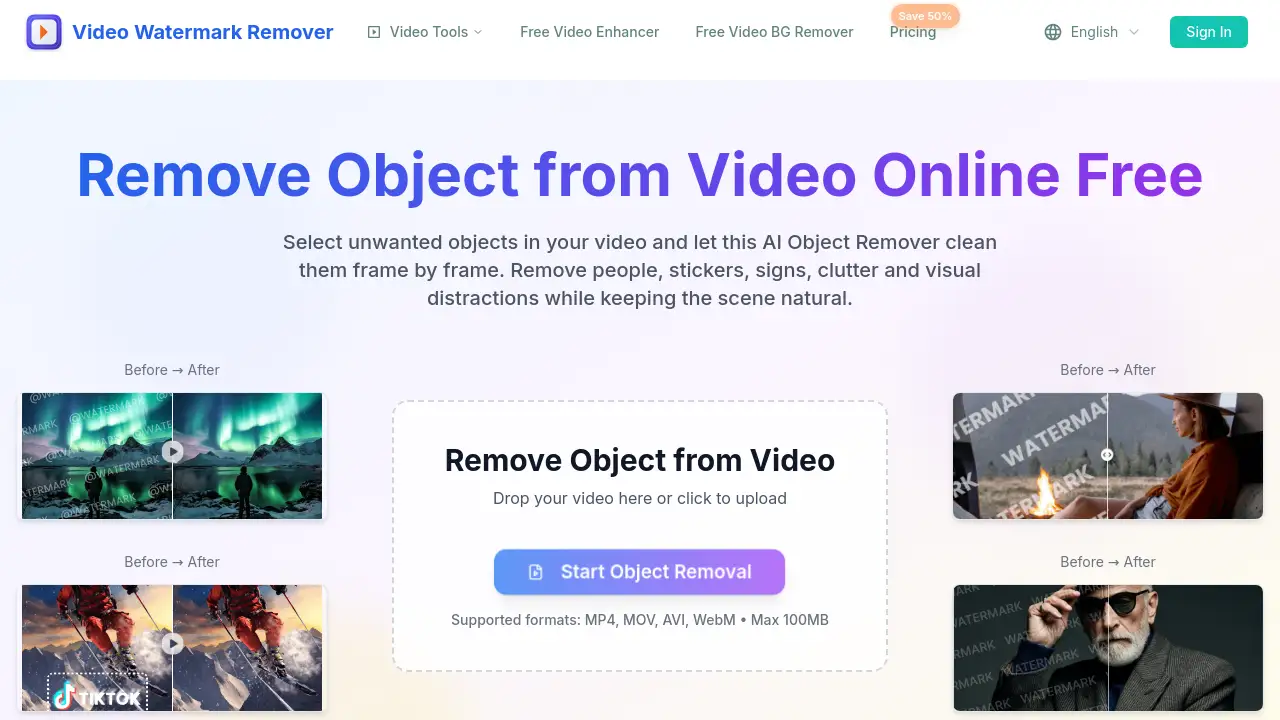
AI Object Remover for Video is an online tool that removes unwanted people, stickers, signs, clutter, and distractions from MP4, MOV, and WebM clips. This AI Object Remover for Video lets users mark an object with a brush and then cleans that object frame by frame. The AI Object Remover for Video is built for creators who want a natural-looking result without using a full video editor.
What is AI Object Remover for Video?
AI Object Remover for Video is a web-based video cleanup tool from the Video Watermark Remover platform. It solves a common editing problem: unwanted items in footage. Instead of manually cloning frames, users draw over the object and let AI rebuild the background. The AI Object Remover for Video works directly in the browser, so there is no desktop software to install. It is suitable for anyone who needs to remove object from video quickly, including social media creators, online sellers, marketers, and casual editors.
The main benefit of this AI Object Remover for Video is that it keeps motion, lighting, and texture consistent after the object disappears. It also supports MP4, MOV, AVI, and WebM files, making it a flexible video object remover for common workflows. As a video object remover, it is designed for people who do not want to learn complex editing tools. The AI Object Remover for Video also handles temporary files securely, which is useful for users who care about privacy.
Key Features of AI Object Remover for Video
AI Video Inpainting
The AI Object Remover for Video reconstructs the hidden background where the object was removed. It keeps edges, lighting, and motion consistent across frames, so the scene looks natural.
Simple Manual Brush Selection
Users draw over the unwanted item with a brush. This tells the AI Object Remover for Video exactly which area to clean and which parts to keep. The workflow is simple enough for beginners.
Frame-by-Frame Object Removal
For complex scenes, the AI Object Remover for Video supports manual brush selection across multiple frames. This video object remover is helpful when the unwanted person or object is moving.
Erase Visual Distractions
Signs, stickers, timestamps, watermarks, labels, and props can be removed with this AI Object Remover for Video. The tool is designed to avoid obvious patches or blur artifacts.
Clean Product and Social Clips
The AI Object Remover for Video cleans product footage and social clips before publishing. It removes price labels, cables, packaging, and other clutter from ads or posts.
Works with Common Video Formats
This AI Object Remover for Video supports MP4, MOV, AVI, and WebM files. It also works on mobile and desktop, so users can remove object from video in a browser.
Secure and Temporary Processing
Files are processed securely and automatically cleaned up after the session. Users do not need an account to try the AI Object Remover for Video.
Use Cases for AI Object Remover for Video
Remove Person from Video
Mark a passerby or background person, and the AI Object Remover for Video will erase them from the clip while keeping the scene stable. This is useful for travel videos and crowd shots.
Clean Stickers and Emoji Overlays
Creators can delete stickers, emojis, or text overlays from short-form clips. The AI Object Remover for Video helps restore the original footage beneath the overlay.
Fix Product and E-Commerce Videos
Online sellers can remove product props, price labels, cables, or packaging items from product videos. This video object remover makes e-commerce footage look clear and professional.
Clean Travel and Event Footage
Signs, timestamps, and accidental frame elements can appear in travel or event clips. The AI Object Remover for Video removes these distractions while preserving the natural background.
Improve Marketing and Social Videos
Marketers can use the AI Object Remover for Video to clean ads and social videos before posting. Removing unwanted objects helps focus attention on the main message.
How to Use AI Object Remover for Video
Using the AI Object Remover for Video is straightforward. Follow these steps:
- Upload the video: Choose an MP4, MOV, AVI, or WebM file with an unwanted object, person, sticker, or sign.
- Mark the object: Use the brush to draw over the item you want to remove. The AI Object Remover for Video uses this selection to locate the object.
- Process the clip: Let the AI Object Remover for Video clean the object frame by frame and rebuild the background.
- Preview and download: Check the result in the browser, then download the clean, object-free video.
This simple workflow makes the AI Object Remover for Video easy to use for both beginners and experienced editors.
Target Audience for AI Object Remover for Video
- Social media creators
- E-commerce sellers
- Marketers and advertisers
- Travel vloggers and event videographers
- Anyone who wants to remove object from video without complex software
- Small business owners who need clean product clips
Is AI Object Remover for Video Free?
The product page does not list exact pricing for the AI Object Remover for Video. The tool is part of the Video Watermark Remover platform, which has a pricing page and occasional discounts. Users can try the upload workflow in the browser, but the full plan details are not published on the object remover page.
To know the current price, visit the official Pricing page at videowatermarkremover.org. Since the site has offered savings promotions in the past, the final cost may depend on the selected plan. A free or trial option may be available, but the exact details are best confirmed on the official pricing page.
AI Object Remover for Video's Pros and Cons
| Aspect | Pros | Cons |
|---|---|---|
| Ease of use | Simple brush selection, no video editing skills needed | Users need to mark objects manually |
| Output quality | AI rebuilds background for natural-looking results | Complex scenes may need frame-by-frame adjustment |
| Platform | Works in browser on mobile and desktop | Requires internet connection and a modern browser |
| Formats | Supports MP4, MOV, AVI, WebM | Max file size is 100 MB |
| Pricing | No desktop software or account needed to start | Exact plan cost is not transparent |
Frequently Asked Questions about AI Object Remover for Video
What objects can I remove from a video?
With the AI Object Remover for Video, users can remove people, stickers, signs, labels, cables, timestamps, emojis, product props, and other visual distractions. The tool works best for small to medium objects in clear scenes.
Can I remove a person from a video?
Yes. The AI Object Remover for Video can remove background people and passersby. Mark the person with the brush, and the AI will erase them while rebuilding the background.
Will the background look natural after object removal?
The AI Object Remover for Video uses video inpainting to reconstruct the covered area. It aims to keep edges, lighting, and motion consistent. For complex moving objects, manual frame-by-frame selection may improve the result.
Can AI remove moving objects from video?
Yes. This video object remover can handle moving objects, but users may need to mark the object across several frames. The frame-by-frame selection helps the AI follow the object through the clip.
Which video formats are supported?
The AI Object Remover for Video supports MP4, MOV, AVI, and WebM files. The maximum upload size is 100 MB.
Is this AI Object Remover free to try?
The exact free or paid details are not clearly listed on the tool page. For current pricing, users should check the official pricing page on the Video Watermark Remover website.
AI Object Remover for Video Tags
AI Object Remover for Video, remove object from video, remove person from video, video object remover, remove stickers from video, remove signs from video, AI video object remover, remove logo from video, remove text from video, object remover online, clean video distractions, remove unwanted objects from video