Introduction
Seed Audio AI offers a powerful platform for AI music generation and full-scene audio creation. This review explores its features, use cases, and pricing.
What is seed audio ai?
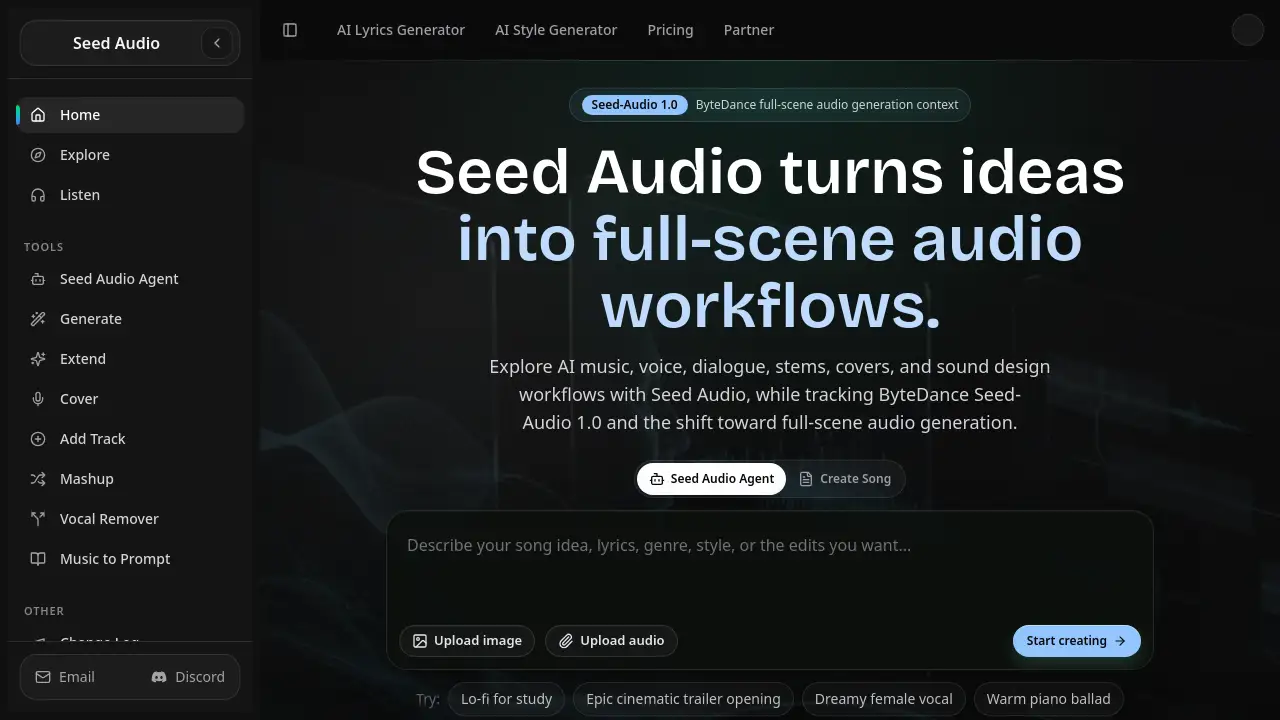
Seed Audio AI is a comprehensive audio generation platform built on ByteDance's Seed-Audio 1.0 model context. It transforms plain ideas into complete audio workflows, including music, voice, dialogue, stems, covers, and sound design. The platform eliminates the complexity of jumping between multiple audio tools by offering one guided environment. Users can generate instrumental tracks from text prompts, create AI covers, isolate vocals, remix songs, and extend existing audio — all without needing deep technical skills.
The primary problem Seed Audio AI solves is the fragmented nature of current audio production. Traditionally, creating a full song required separate tools for lyrics, melody generation, mixing, vocal isolation, and mastering. Seed Audio AI consolidates these steps into a single workflow. It is suitable for content creators, musicians, video editors, game developers, and brands looking for quick, high-quality audio assets. The platform also tracks the broader industry shift toward full-scene audio generation, making it relevant for professionals exploring the future of sound.
Key Features of seed audio ai
Seed Audio Agent
The Seed Audio Agent is a guided chat interface that handles the entire audio workflow. Users describe the outcome they want, and the agent decides whether to generate, extend, cover, remix, separate vocals, or replace a section. No tool selection, prompt rebuilding, or form hopping is required. It auto-repairs failures, such as copyright flags, by rewriting prompts or fixing parameters.
AI Cover Song & Voice Clone
This feature lets users upload a reference song and transform it into a new version using a different voice or style. The AI Cover Song capability works with the Custom Voice feature, which allows voice cloning from uploaded audio samples. These tools are useful for creating personalized covers or unique vocal textures.
AI Stem Splitter & Vocal Remover
Seed Audio AI includes a stem splitter that separates a track into individual components, such as vocals, drums, bass, and other instruments. The Vocal Remover tool isolates or removes vocals from any audio file. These features are essential for remixing, sampling, or extracting elements for new projects.
Music Extend & Replace Section
Users can extend a generated song to make it longer or replace a specific section to adjust the arrangement. These tools give detailed control over the track’s structure, making it possible to fine-tune intros, choruses, and outros without starting from scratch.
AI Mashup Generator
The AI Mashup Generator combines two or more songs into a new, blended track. Users can upload reference tracks, and the AI analyzes their structure to create a seamless mashup. This feature is popular for DJs and content creators looking for unique remixes.
Commercial-Use Rights & Generation Certificate
Eligible plans include a commercial-use license and a generation certificate for each track. This provides legal protection for using AI-generated music in videos, ads, games, and other public projects. The certificate serves as proof of ownership and compliance.
Use Cases for seed audio ai
Video Music Production
Video editors can create custom soundtracks that match their footage’s mood, pacing, and energy. The platform allows users to draft an initial track, then tweak the intro, runtime, and intensity to fit the edit. Commercial usage rights make it safe for monetized content.
Brand Jingles & Marketing Music
Marketers can convert a campaign concept into multiple music directions in minutes. They can pick the best fit and polish the hook, vocals, or arrangement for final release. This speeds up the creative process for audio branding.
Game Music & Sound Design
Game developers can design battle themes, menu loops, or exploration cues from a text prompt. They can create alternate versions or pull usable assets for full projects, saving time on audio production.
Wellness & Podcast Content
Creators can generate calm intros, loops, and background beds for meditation apps, wellness sessions, or podcast episodes. The platform allows extending or softening tracks to match the pace of the content.
How to Use seed audio ai
- Start with an idea. Go to the Seed Audio AI platform and describe the audio outcome you want. You can submit a text prompt, lyrics, an audio file, or a reference song.
- Let the Seed Audio Agent work. The agent decides the best approach — whether to generate, extend, cover, remix, separate vocals, or replace a section. No manual tool selection is needed.
- Shape the result. Use tools like Extend, Replace Section, or AI Mashup Generator to refine the track. You can keep the good parts and edit further.
- Save your draft. When the track fits your needs, save it to your library. You can return to it later for further editing or export it as MP3 or WAV with a generation certificate.
Target Audience for seed audio ai
- Content creators and YouTubers
- Musicians and producers
- Video editors and filmmakers
- Game developers and sound designers
- Marketing and branding professionals
- Podcasters and wellness content creators
- DJs and remix artists
Is seed audio ai Free?
Yes, Seed Audio AI offers a free tier to start. Users can try the platform without entering a credit card. Paid plans unlock more credits and advanced features.
| Plan | Price | Features |
|---|---|---|
| Basic | $9.99/month (billed yearly) | 900 credits/month, text & lyrics to music, AI lyrics generator, extend songs, replace section, vocal remover, basic stem splitter, MP3 download, commercial-use rights, generation certificate |
| Pro | $19.99/month (billed yearly) | 1,900 credits/month, all Basic features, AI cover song, custom voice/voice clone, audio upload, upload music to extend, Agent Pro workflow, WAV export, priority email support |
| Max | $69.99/month (billed yearly) | Large credit pool, all Pro features, highest audio upload allowance, advanced stem tools, expanded commercial-use license, VIP support, lossless WAV delivery, early access to new models |
Unused credits roll over to the next month. Users can cancel anytime.
seed audio ai's Pros and Cons
| Aspect | Pros | Cons |
|---|---|---|
| Features | One platform covers generation, covers, stems, remixes, and editing | Advanced features like voice clone require higher-tier plans |
| Ease of Use | Seed Audio Agent eliminates tool selection and prompt rebuilding | Beginners may need a few tries to get desired output quality |
| Pricing | Free tier available; yearly plans offer 41-53% discounts | Higher-tier plans may be costly for casual users |
| Output Quality | ByteDance Seed-Audio 1.0 model provides professional-grade audio | AI-generated music can sometimes lack human nuance |
| Commercial Use | Clear commercial license and generation certificate | Only eligible plans include full commercial rights |
| Workflow Speed | Auto-repair failures and context retention reduce rework | Relies on stable internet connection for cloud processing |
Frequently Asked Questions about seed audio ai
How do I get started with Seed Audio AI?
Go to the Seed Audio AI homepage, click "Start," and describe the audio outcome you want. You can submit a text prompt, lyrics, audio file, or reference song. No credit card is needed for the free tier.
Can I use Seed Audio AI for commercial projects?
Yes, eligible plans include a commercial-use license and a generation certificate. The license covers using generated music in videos, ads, games, and other public projects. Check the plan details to confirm coverage.
What is the Seed Audio Agent?
The Seed Audio Agent is a guided chat workflow. You describe the result you want, and it decides whether to generate, extend, cover, remix, separate vocals, or replace a section. It handles tool selection and prompt rebuilding automatically.
How does the AI Cover Song feature work?
Upload a reference song, and the AI Cover Song feature transforms it into a new version using a different style or voice. It works with the Custom Voice tool for personalized vocal clones.
What audio formats can I download?
Basic plans offer MP3 download. Pro and Max plans also support WAV and lossless WAV export for higher-quality audio.
Does Seed Audio AI save my work?
Yes, the platform provides permanent history storage. You can save drafts, return to them later, and pick up work from where you left off. Unused credits also roll over to the next month.
seed audio ai Tags
seed audio ai, AI music generation, ByteDance Seed-Audio 1.0, full-scene audio, AI voice cloning, AI cover song, stem splitter, vocal remover, AI mashup generator, commercial music license, audio workflow, AI sound design