Introduction
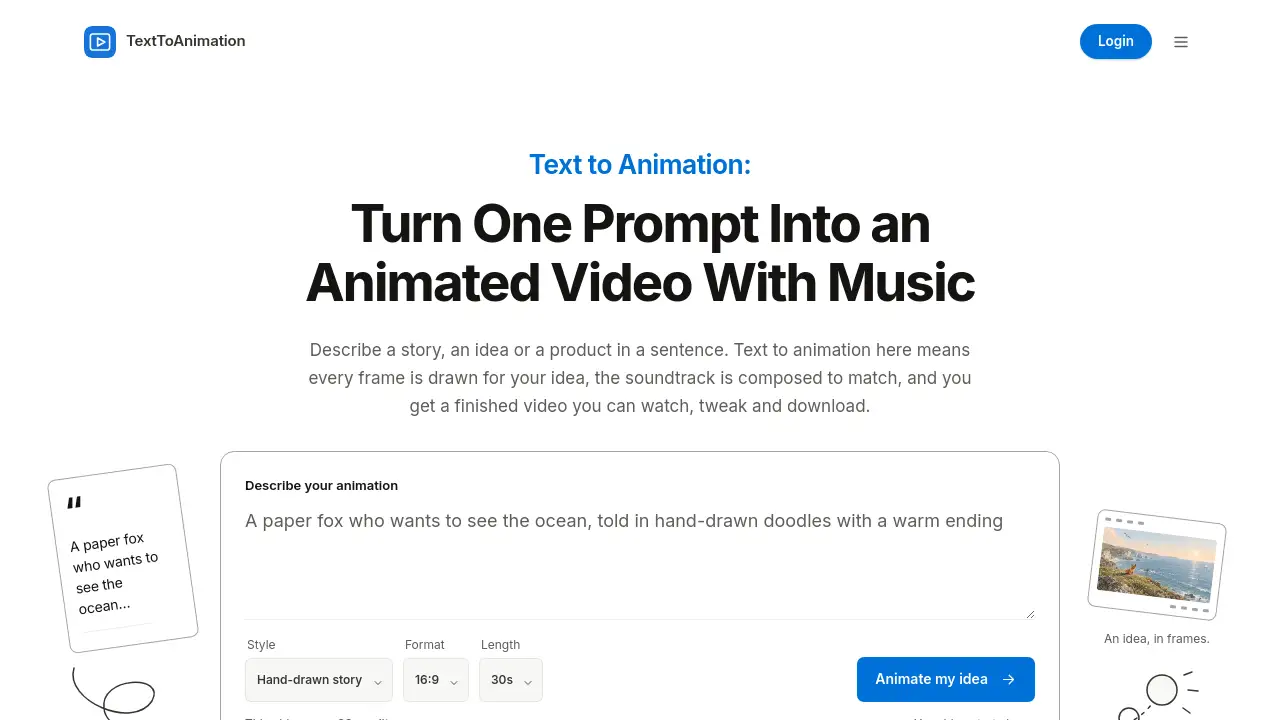
Text to animation made simple with TextToAnimation. This AI animation generator turns a written prompt into a hand-drawn animated video with music in one step. It is made for creators, teachers, marketers, and anyone who wants a finished short video from a simple description.
What is TextToAnimation?
TextToAnimation is a text to animation AI platform that turns a written description into a finished animated video. Instead of generating a rough clip and hoping it matches the idea, the tool draws every frame for the prompt and composes a soundtrack to fit. This makes it different from a standard AI video generator, because the result is planned scene by scene and line by line. Users can describe a story, an idea, or a product in a sentence, choose a visual style, and get a hand-drawn animated video ready to watch, refine, and download.
The platform supports 16:9, 9:16, and 1:1 formats, lengths from 15 to 60 seconds, and exports 1080p MP4 files at 30 frames per second. Text to animation here works as a prompt to animation workflow for explainers, stories, launches, and social posts. It is suitable for beginners who do not want coding tools, API keys, or overnight rendering, and for experienced creators who need a fast first cut. Videos are private by default, and users can share a controlled link when ready.
Key Features of TextToAnimation
One-Prompt Text to Animation
Describe a story, idea, or product in a sentence, and the text to animation AI draws every frame. The prompt drives the characters, pacing, and visual plan.
Hand-Drawn Style Choices
Pick Hand-drawn story, Explainer, or Product launch, then set the format and length. This helps the AI animation generator match the message to the platform.
Music Included with Every Video
Each hand-drawn animated video comes with a soundtrack composed for it. The music is part of the download, so no separate audio editing is required.
Refine with Plain Words
Ask for changes such as “warmer colors,” “faster in the middle,” or “make the ending at night.” The refine tool rewrites only what the user asked for and keeps the rest. A refine uses 10 credits.
Ready for Every Feed
Export 16:9, 9:16, or 1:1 video from 15 to 60 seconds. The final file is a 1080p MP4 at 30 frames per second, suitable for feeds, lessons, landing pages, and Reels.
Start from Proven Prompts
The gallery shows official examples, and each one has a Remix button. This loads the original prompt so users can make their own version of the prompt to animation idea.
Private by Default
Every text to animation video is private until the user shares it. A share link can be turned off at any time, and private videos do not appear in the gallery or search.
Fair Credit Use
Every video uses 30 credits, no matter its length. If a video fails to come together, its credits return to the balance automatically.
Use Cases for TextToAnimation
Story and Imagination
A user can describe a lonely lighthouse keeper, a lost whale, or a cat who runs a bakery. Text to animation turns those two lines into a short hand-drawn story with a beginning, middle, and end.
Explainers and Education
Teachers and creators can type “how a vaccine trains your immune system” and get a step-by-step explainer. This text to animation AI format works for lessons, slides, threads, and short social videos.
Product Launch and Announcement
A product team can describe what a new item does and who it is for. The AI animation generator can produce a punchy launch film in 16:9 for a landing page or 9:16 for social.
Social Media Content
Short videos are useful on several platforms. With 9:16 and 1:1 options, prompt to animation output can fit Reels, Shorts, TikTok-style feeds, and square posts.
Personal or Viral-Style Doodles
Users who saw AI videos tell stories in doodles can make their own. By choosing Hand-drawn story, they can create a private text to animation video and share it only if they want.
How to Use TextToAnimation
- Describe it. Write what should happen, including a character, a feeling, an idea to explain, or a product to show. Any language works.
- Pick a look. Choose Hand-drawn story, Explainer, or Product launch, then select the format and length.
- Watch it come together. The animation plays in the page with its music as soon as it is drawn. Most videos are ready in a few minutes, and the page can be closed while it works.
- Refine and download. Ask for changes in plain words, then download a 1080p MP4. Users can also remix an official example to start from its prompt.
- Share if desired. Keep the text to animation video private or create a share link that can be turned off anytime.
Target Audience for TextToAnimation
- Content creators who need short animated videos from written ideas.
- Educators and explainer creators who turn concepts into visual lessons.
- Marketers and product teams who need launch or announcement videos.
- Small business owners who want social media clips without a production crew.
- Storytellers and hobbyists who enjoy hand-drawn animated videos.
- Social media managers who need 16:9, 9:16, or 1:1 formats.
- Beginners looking for text to animation AI without coding or API setup.
Is TextToAnimation Free?
TextToAnimation offers free credits for new accounts in most countries. These are usually enough for a first video. After that, users can top up credits or subscribe, but the reference information points to the official pricing page for current plans.
| Plan | Price | Features |
|---|---|---|
| Free trial credits | $0 for new accounts in most countries | Enough for a first video; every video uses 30 credits |
| Credit top-ups / subscription | See official pricing page | 30 credits per video, 10 credits per refine, failed videos refund credits |
Every text to animation video uses 30 credits, whether it is 15, 30, or 60 seconds. A refine uses 10 credits. If a video fails, the credits go back to the balance automatically. Users should check the official pricing page for the latest top-up and subscription details.
TextToAnimation's Pros and Cons
| Aspect | Pros | Cons |
|---|---|---|
| Pricing | Free credits for new accounts in most countries; failed videos refund credits | 30 credits per video; refine costs 10 credits; paid pricing is not fully listed in the reference |
| Features | Text to animation in one prompt; hand-drawn frames; music included; 1080p MP4; 16:9, 9:16, and 1:1 | Safe-for-work content only; no advanced editing suite mentioned |
| Ease of use | No coding tools, API keys, or overnight setup; browser-based workflow | Results likely depend on clear prompts |
| Privacy | Private by default; controlled share link; private videos not in gallery or search | Users must manage share links if they want to limit access |
| Output | 1080p MP4 at 30 fps with music included; 15 to 60 seconds | Download support depends on current browsers; if export fails, the platform saves the video and informs the user |
Frequently Asked Questions about TextToAnimation
What is text to animation?
Text to animation turns a written description into an animated video. On TextToAnimation, the user describes a story, idea, or product, and the AI draws every frame and composes the music. The result is a finished short video instead of a stock clip.
How long does it take to make a video?
Most videos are ready in a few minutes. Users can close the page while the text to animation video is being drawn, and the result is waiting when they return.
Can I change the video after it is made?
Yes. The Refine tool lets users describe changes in plain words, such as colors, pacing, the ending, or the music. Only the requested parts change. A refine uses 10 credits.
Is text to animation free to try?
New accounts get free credits in most countries, usually enough for a first video. After that, users can top up credits or subscribe. The official pricing page has current details.
Who can see my videos?
Only the user, by default. Every text to animation video is private until the user creates a share link. Anyone with the link can watch, but the video does not appear in the gallery or search, and the link can be turned off anytime.
What can't I make with TextToAnimation?
TextToAnimation only makes safe-for-work videos. Prompts with adult content, graphic violence, or real public figures and private people are declined.
TextToAnimation Tags
text to animation, text to animation AI, AI animation generator, prompt to animation, hand-drawn animated video, text to animation generator, AI video generator, text to video AI, explainer video maker, product launch video, 1080p MP4 animation, AI story video