Introduction
An AI tool to remove green screen from images online for free in one click.
What is Green Screen Remover?
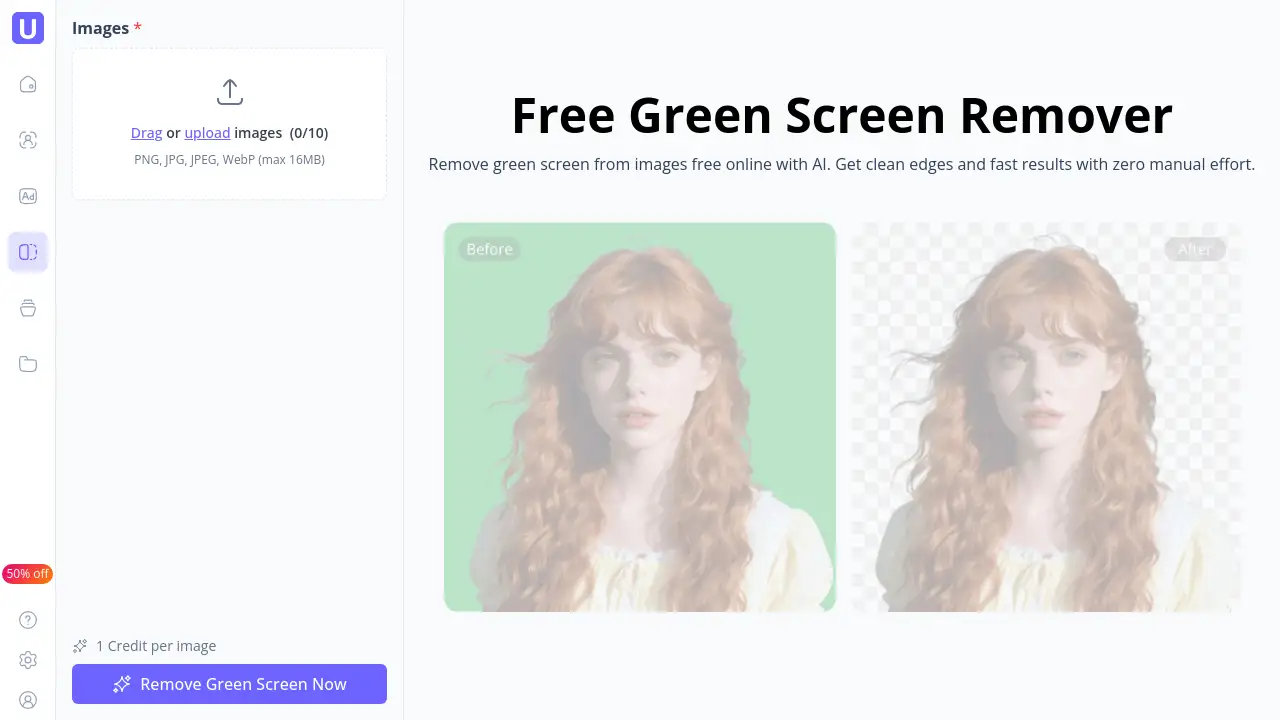
Green Screen Remover is an AI-powered online tool designed to quickly and automatically erase green backgrounds from images. It solves the common problem of needing complex software or editing skills to achieve a clean background removal. The tool is ideal for creators, marketers, and anyone needing to produce professional-looking visuals without the manual effort of traditional photo editing. By automating subject detection and edge refinement, it makes creating content for social media, ads, or e-commerce significantly faster and more accessible.
Key Features of Green Screen Remover
One-Click Automatic Subject Detection
The system instantly detects the main subject in an image, separating it from the green screen background without requiring any manual selection or adjustments from the user.
AI Edge Refinement for Natural Cutouts
Advanced AI algorithms refine fine details like hair, fabric, and transparent objects to deliver clean edges and reduce green spill, resulting in a more natural and professional-looking final image.
Fully Online, No Installation Required
This green screen remover operates entirely within a web browser, eliminating the need to download or install any software, which allows for a fast and convenient editing workflow from any device.
Fast Processing for Instant Results
Images are processed in seconds, enabling users to remove green screen backgrounds quickly and move on to downloading or using their clean images without delay.
Use Cases for Green Screen Remover
Social Media Content Creation
Creators can quickly remove green screen from images to create eye-catching posts, stories, and thumbnails for platforms like TikTok, Instagram, and YouTube.
E-commerce Product Photography
Online sellers can efficiently edit product photos by removing green screen backgrounds, allowing for easy background replacement to suit different store themes or marketing campaigns.
Digital Marketing and Ad Creatives
Marketing specialists can produce a high volume of clean, professional ad visuals and banners rapidly, streamlining the content creation process for performance campaigns.
Graphic Design Projects
Designers can integrate this tool into their workflow for batch processing images, saving time on initial background removal to focus on more complex creative tasks.
How to Use Green Screen Remover
Using the Green Screen Remover is a straightforward, three-step process that takes just moments.
- Upload Your Image: Navigate to the tool's website and upload your image with a green background. It supports common formats like PNG, JPG, and WebP.
- Automatic AI Processing: Once uploaded, the AI will automatically detect the subject and remove the green screen. No further input is required; the process completes in seconds.
- Download the Result: Preview the image with the green background removed. If satisfied, simply download the clean, transparent-background image to your device for immediate use.
Target Audience for Green Screen Remover
- Social Media Content Creators and Influencers
- E-commerce Store Owners and Product Photographers
- Digital Marketing Specialists and Ad Managers
- Graphic Designers and Video Producers
- Bloggers and Hobbyists needing quick image edits
Is Green Screen Remover Free?
Based on the reference information, Green Screen Remover operates on a credit system. A free option is available, allowing users to try the service. For specific details on credit allocation, pricing plans, or subscription models, users should refer to the official pricing page on the UGCMaker website.
| Plan | Price | Key Feature Mentioned |
|---|---|---|
| Free Tier | $0 | Allows users to remove green screen with 1 credit per image. |
Green Screen Remover's Pros and Cons
| Aspect | Pros | Cons |
|---|---|---|
| Ease of Use | Extremely simple, one-click operation with no learning curve. | Limited manual control for users who want to fine-tune the AI's selection. |
| Speed & Efficiency | Processes images in seconds, dramatically speeding up workflow. | Processing speed may depend on internet connection and server load. |
| Accessibility | Completely free to start and use online without any software installation. | The free tier is limited by a credit system, requiring a plan for high-volume use. |
| Output Quality | Delivers clean edges and handles complex details like hair well for an automated tool. | May not achieve perfect studio-quality results in every single edge case compared to manual professional editing. |
Frequently Asked Questions about Green Screen Remover
Is Green Screen Remover really free to use?
Yes, there is a free tier that allows users to remove green screen from images. The service uses a credit system, where one image typically costs one credit. Details on how to obtain or purchase credits can be found on the official website.
What image formats does it support?
The tool supports popular image formats including PNG, JPG, JPEG, and WebP, as indicated on the upload interface.
How accurate is the AI at removing green screens?
The AI is designed for high precision, aiming for clean cutouts with refined edges. It performs well on a wide variety of subjects and objects, though results can vary with image quality and complexity.
Do I need any editing skills to use this tool?
No editing skills are required. The Green Screen Remover is built for simplicity, automating the entire process from subject detection to background removal with a single click.
Can I use it on my phone or tablet?
Yes, since the tool is entirely web-based and runs in a browser, it is accessible and functional on most smartphones, tablets, and desktop computers.
What is the maximum file size for uploads?
According to the reference information, the maximum file size for uploads is 16MB per image.
Green Screen Remover Tags
green screen remover, remove green screen, AI background remover, online green screen tool, free background removal, remove green screen from image, automatic subject detection, clean edge cutout, image editing online, social media tool, product photo editor, fast background remover