Introduction
Real ESRGAN image upscaler enlarges low-res photos online.
What is real esrgan image upscaler?
The real esrgan image upscaler is a browser-based tool built around the Real-ESRGAN super-resolution model. It takes a low-resolution JPG, PNG, or WebP image, enlarges it to a chosen size, and uses a trained neural network to predict extra visual structure while reducing common blur, noise, and compression artifacts. Instead of only stretching pixels like conventional resizing, this online image upscaler aims to make the enlarged result look clearer and more usable.
It suits photographers, ecommerce sellers, designers, social media creators, and anyone who needs to enlarge an image without installing software. The real esrgan image upscaler matters because it offers practical controls, preview, download, and batch image upscaling in a simple workspace. Super-resolution cannot recover missing original detail, so the output should be checked before final use.
Key Features of real esrgan image upscaler
AI Super-Resolution for Real-World Images
The real esrgan image upscaler uses AI upscaling to enlarge low-resolution photos while addressing blur, noise, and compression artifacts.
Flexible Upscale Sizes
Choose 1×, 2×, 4×, 6×, or 8× output sizes and select an output format for websites, product listings, presentations, or creative projects.
Face Enhance Option
Enable Face Enhance when portrait detail matters, then inspect eyes, hair, teeth, and skin at full size before downloading.
Batch Image Upscaling
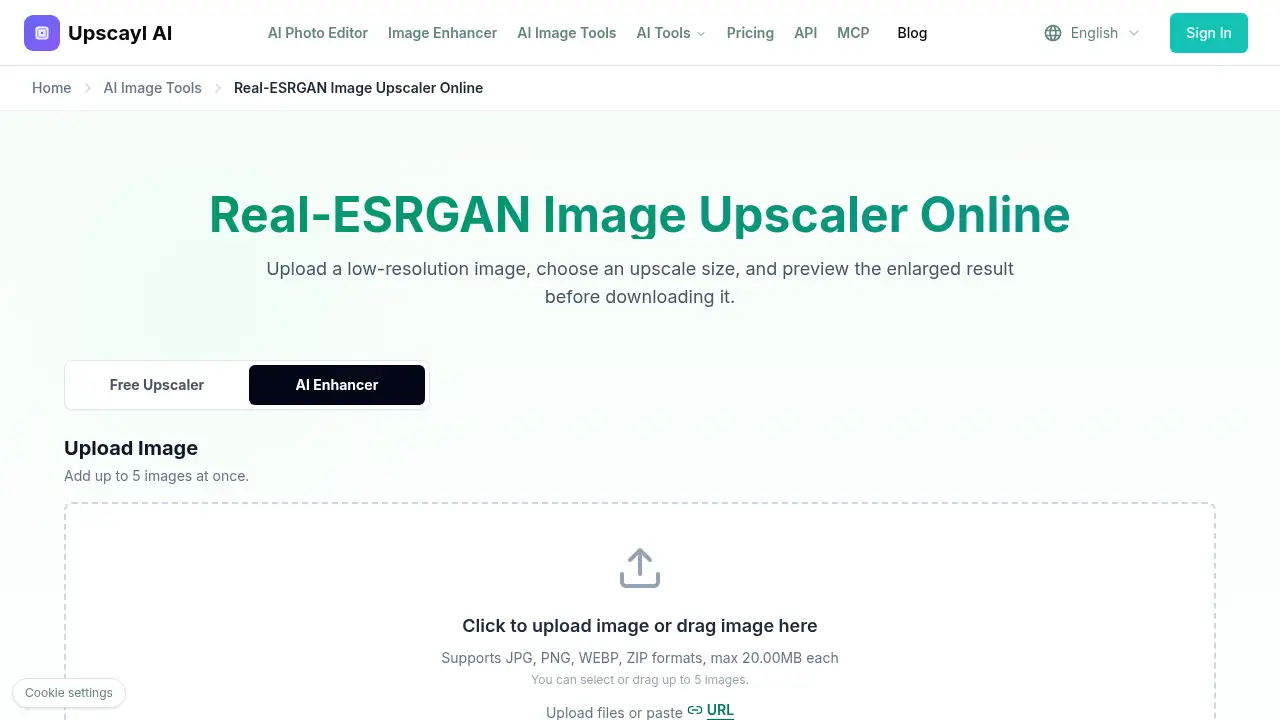
Upload up to five images at once to prepare a set of product photos, graphics, or related assets in one session.
Preview Before Download
Use the real esrgan image upscaler to preview the enlarged image before saving it, checking faces, small text, logos, edges, and repeating textures.
Browser-Based Workflow
Run the real esrgan image upscaler online without downloading model files or setting up a command-line environment.
Use Cases for real esrgan image upscaler
Enhance Old Photos
The real esrgan image upscaler can enlarge small digital photos or scans for modern screens, albums, and personal archives.
Upscale Product Images
This real esrgan image upscaler helps prepare low-resolution product photos for larger ecommerce listings, banners, and marketing layouts.
Enlarge Social Media Images
Increase the size of thumbnails, posts, profile images, and promotional graphics for larger social media placements.
Upscale AI-Generated Images
Raise the resolution of AI-generated artwork before using it on a website, in a presentation, or in a design project.
Improve Presentation and Archive Images
Make small graphics and photos easier to view in reports, slides, and family archives, then review the output before saving.
How to Use real esrgan image upscaler
- Open the real esrgan image upscaler and upload a JPG, PNG, or WebP file from your device, paste an image URL, or add up to five images.
- Select Standard mode or the relevant option, choose an upscale size such as 2×, 4×, 6×, or 8×, and set the output format.
- Enable Face Enhance if the image is a portrait and face clarity is important.
- Start the AI upscaling process and preview the result at full size.
- Check faces, text, fine lines, logos, and repeated textures before downloading the higher-resolution file.
Target Audience for real esrgan image upscaler
- The real esrgan image upscaler suits photographers and photo archivists who need to enlarge old or small images.
- Ecommerce sellers preparing product photos for larger listings and banners.
- Designers and content creators who need an AI image upscaler for graphics, artwork, and social media.
- Social media managers resizing thumbnails, posts, and profile images.
- Users who want an online image upscaler without installing desktop software.
- Teams handling small batches of images through batch image upscaling.
Is real esrgan image upscaler Free?
The available reference information does not list a price or confirm a free tier for the real esrgan image upscaler. The workspace mentions displayed file and credit limits, so usage may depend on limits shown at upload time. For current free usage rules or paid plans, check the official Real-ESRGAN upscaler site. The table below only reflects what is known from the provided information.
| Plan | Price | Features |
|---|---|---|
| Not specified | Not listed | Upload up to five images, choose upscale size and output format, preview, and download; credit limits may apply |
| Paid plans | Not listed | No pricing details are provided in the reference content |
real esrgan image upscaler's Pros and Cons
| Aspect | Pros | Cons |
|---|---|---|
| Pricing | Browser access may reduce software costs; check the official site for current limits | Pricing and free limits are not clear from the reference content |
| Features | AI super-resolution, Face Enhance, 1×–8× sizes, batch upload, and preview | Super-resolution cannot recover truly missing detail |
| Ease of use | Simple upload, settings, preview, and download workflow | Results need manual inspection for faces, text, logos, and patterns |
| Accessibility | Online image upscaler with no installation | Requires a browser and file upload; credit limits may affect larger jobs |
Frequently Asked Questions about real esrgan image upscaler
What is the real esrgan image upscaler used for?
The real esrgan image upscaler is used to enlarge low-resolution images online with AI upscaling. It can improve visible detail and reduce common blur, noise, and compression artifacts, but it cannot recover original detail that is missing from the source.
Does this online image upscaler work for portraits?
Yes. The workspace offers a Face Enhance option and a Portrait mode for face-focused work. Inspect eyes, hair, teeth, and skin at full size because AI-generated detail may not match the original scene.
Can I upscale more than one image at a time?
Yes. This real esrgan image upscaler supports up to five images at once, making batch image upscaling useful for product photos, related graphics, or small project sets. Review file and credit limits before processing.
What image formats can I upload?
The tool supports JPG, PNG, and WebP files, plus ZIP uploads according to the reference content. Each file can be up to 20 MB. A cleaner source usually gives the Real-ESRGAN model more reliable visual information.
Does enlarging an image recover the original detail?
No. The real esrgan image upscaler predicts plausible pixels for a larger grid. It can make an image look clearer, but new detail may not match what existed in the original photo, so check important areas before downloading.
Is this different from normal image resizing?
Yes. Conventional resizing calculates a bigger grid from existing pixels. Real-ESRGAN image upscaling uses a trained neural network to predict additional visual structure, which may improve perceived clarity.
real esrgan image upscaler Tags
real esrgan image upscaler, Real-ESRGAN, AI image upscaler, online image upscaler, upscale image online, image super-resolution, enlarge image, AI upscaling, batch image upscaling, face enhance, low-resolution image upscaler, photo upscaler