Introduction
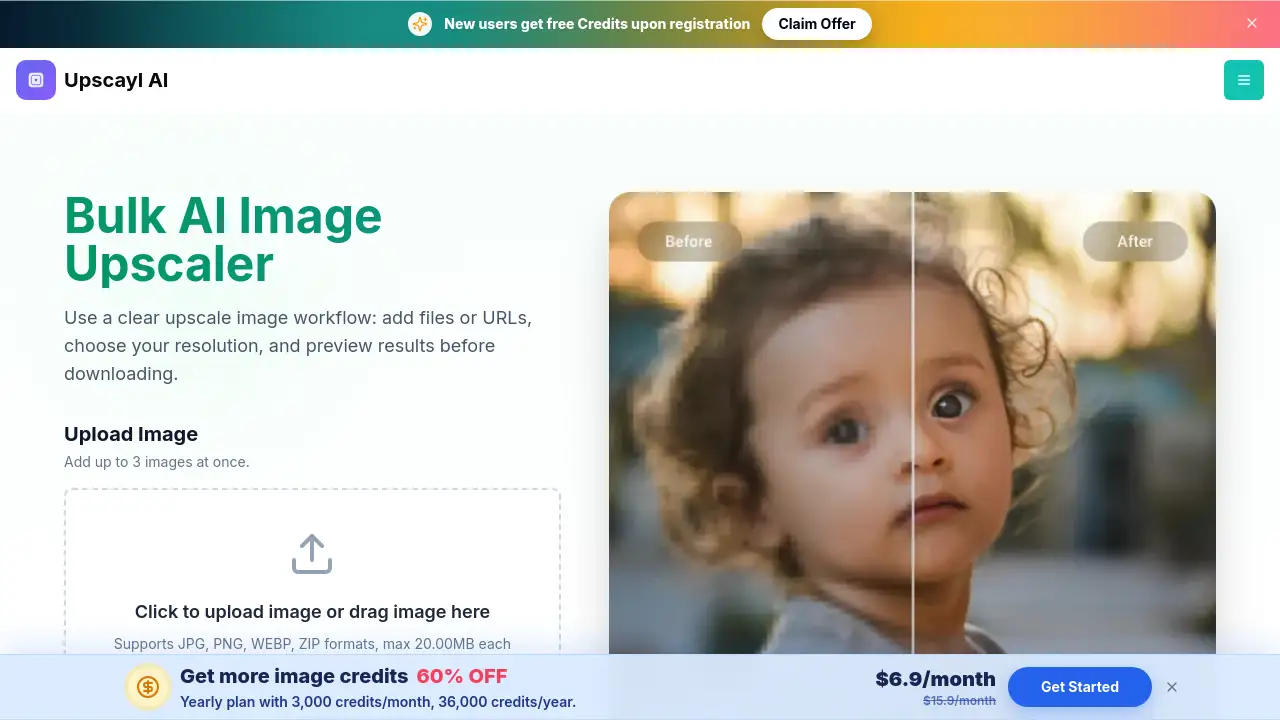
Batch Upscale Image is an online AI upscaler. It lets you upscale image quality in about 30 seconds using JPG, PNG, WebP, or ZIP files. Users can upload files or paste URLs directly, and free accounts can process 3 images per batch. Paid users can batch upscale image files up to 10 images at higher resolutions. It also includes face enhancement and output format selection. For anyone who needs a fast, simple batch upscale image solution, this tool is a practical choice.
What is Batch Upscale Image?
Batch Upscale Image is an AI image upscaler that rebuilds detail instead of just stretching pixels. It solves the common problem of blurry or low-resolution photos by reconstructing edges, textures, and fine details. The service is designed for product photos, AI art, screenshots, old pictures, and client assets. It is suitable for e-commerce sellers, content creators, and teams that need consistent visuals. Because every batch upscale image job can be previewed before download, users avoid wasted work and can choose the right output level first.
Key Features of Batch Upscale Image
AI Image Rebuilding
Instead of stretching pixels, this AI image upscaler reconstructs missing detail, producing cleaner edges and sharper textures. This makes it easier to batch upscale image files without losing quality.
Multiple Resolution Options
Users can choose 1K, 2K, 4K, 6K, or 8K output depending on the project. Free users have access to 2x and 4x quick tests, while paid users can unlock 6K and 8K outputs. This flexible approach lets any batch upscale image task match the exact resolution needed.
Face Enhancement
The tool can run GFPGAN face enhancement at the same time as upscaling. This feature helps restore facial details in portraits and old photos, making it a valuable addition to any batch upscale image workflow.
URL and Batch Uploads
Users can upload JPG, PNG, or WebP files, or paste HTTPS image URLs directly. ZIP formats are supported as well. This makes it convenient to batch upscale image files from local folders or remote links.
Preview and Compare
A slider lets users compare the original image with the AI-upscaled result before saving. This transparency is important because it confirms the output quality before committing to a full batch upscale image process.
Use Cases for Batch Upscale Image
E-commerce Product Photos
Online stores can improve product images with an AI image upscaler, making items look clearer and more professional. A quick batch upscale image run helps prepare multiple product shots at once.
AI Art and Creative Work
Artists who create AI art often need larger formats for prints or banners. Using a batch upscale image tool helps them turn small drafts into sharp final assets without waiting long.
Restoring Old or Compressed Photos
Old family pictures and heavily compressed images can gain new life through an AI image upscaler. The AI removes noise, reduces blockiness, and reconstructs edges, so the batch upscale image procedure improves visual clarity.
Client and Team Assets
Agencies and marketing teams can prepare client visuals more efficiently. Instead of editing one file at a time, they can batch upscale image files, download the full batch, and share sharper results in one round.
How to Use Batch Upscale Image
Using Batch Upscale Image is straightforward.
- Add your image source: Upload local files or paste supported HTTPS image URLs. The uploader accepts JPG, JPEG, PNG, WebP, and ZIP.
- Pick the output level: Choose the resolution that fits your task. Free users can test standard outputs, while 6K and 8K are paid upgrades.
- Run face enhancement if needed: Toggle the GFPGAN option to improve facial details during the batch upscale image process.
- Preview and download: Check the enhanced result with the slider, then download one image or the full batch after processing finishes.
This workflow saves time and reduces guesswork. As an AI image upscaler, it keeps the process simple from start to finish.
Target Audience for Batch Upscale Image
- E-commerce store owners
- Content creators and social media managers
- Graphic designers and digital artists
- Marketing teams and agencies
- Photographers restoring old images
- Anyone who needs a fast AI image upscaler for regular image tasks
Is Batch Upscale Image Free?
Batch Upscale Image has a free tier. For free, users can process 3 images at once and test upscale results. Paid plans unlock 10-image batches and higher output levels such as 6K and 8K. The reviewed page does not show a specific paid price, so users should check the official website for current pricing.
| Plan | Price | Features |
|---|---|---|
| Free | $0 | 3 images per batch, standard outputs, AI image upscaler |
| Paid | Not listed | 10 images per batch, 6K/8K outputs, paid workflows |
Batch Upscale Image's Pros and Cons
| Aspect | Pros | Cons |
|---|---|---|
| Pricing | Free tier available for testing | Paid price not listed on the reviewed page |
| Output Quality | AI rebuilds detail, reduces noise, sharpens edges | 6K/8K outputs require paid plan |
| Workflow | Batch up to 10 images, URL uploads, preview before download | Maximum 20MB per image file |
| Processing Time | Average processing time about 30 seconds | Actual time may vary depending on image size and batch size |
| Supported Formats | JPG, PNG, WebP, ZIP | No explicit mention of GIF or BMP support |
Frequently Asked Questions about Batch Upscale Image
Can I use Batch Upscale Image for free?
Yes. The free plan lets you process 3 images per batch. This is enough to test whether the AI image upscaler provides the quality you need before upgrading to a paid plan.
What does a batch upscale image job include?
A batch upscale image job can include up to 10 images for paid users. You upload files or paste URLs, choose the output resolution, and the tool processes the group automatically.
Which file formats are supported?
The uploader accepts JPG, JPEG, PNG, WebP, and ZIP formats. Each file must be 20MB or less. The AI image upscaler works directly on these formats without requiring conversion.
Can I upscale image quality from a URL?
Yes. Because this is an AI image upscaler, you can paste a supported HTTPS image URL directly into the tool. This makes it easy to process images without downloading them first.
What resolutions can I choose?
Free users can test standard outputs like 2x and 4x. Paid users can choose 6K and 8K outputs for larger projects. The batch upscale image options are displayed upfront, so you know the output size before processing.
Does the tool enhance faces automatically?
No. Face enhancement is a separate toggle. When enabled, the AI image upscaler runs GFPGAN to improve facial details along with the upscale process. This is useful for portraits and older photos.
Batch Upscale Image Tags
Batch Upscale Image, upscale image quality, AI image upscaler, batch image upscaling, upscale images online, AI upscale image, enhance image resolution, 4K upscaler, 8K image upscaler, upscale JPG, upscale PNG, batch upscale image free