Introduction
VideoAny Brazil offers a practical image to video AI solution, allowing users to transform photos and illustrations into short animated clips. By uploading an image, describing the action in Portuguese, and selecting a model, creators can generate videos with controlled motion, duration, and resolution. The platform provides free credits to test the image to video AI workflow before committing to larger plans.
What is VideoAny Brazil?
VideoAny Brazil is an online tool that converts still images into dynamic videos using artificial intelligence. It focuses on giving creators control over movement, clip length, and output quality while comparing different models side by side. The product solves the challenge of animating static visuals without requiring video editing skills. Suitable for marketers, content creators, artists, and anyone needing quick video snippets from photos, it enables users to generate short clips with camera actions like zoom, pan, or orbit. The image to video AI process is simpler than text-to-video because the uploaded image locks in the subject, composition, and style from the first frame. By offering free daily credits and a referral system, the platform lowers the barrier for first-time users. The AI video generator also supports responsible NSFW content for adult fictional characters or consenting real people, expanding creative possibilities.
Key Features of VideoAny Brazil
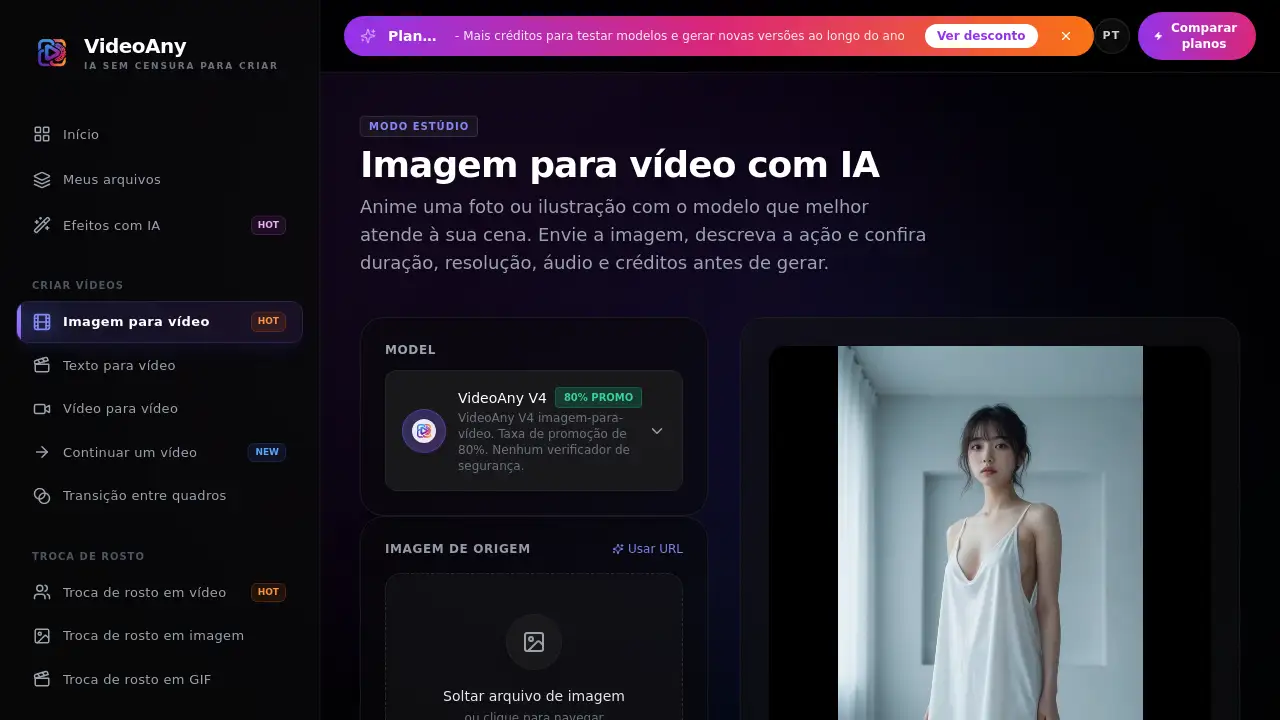
Studio Mode with Model Comparison
The user interface presents models side by side, allowing users to compare outputs before generating. This helps creators choose the best AI video generator for their specific scene.
Motion Control Through Prompts
Users can describe primary actions first, then add camera movements such as zoom, pan, dolly, or orbit. The system interprets text to dictate how the animate image AI behaves, resulting in more predictable motion.
Adjustable Duration and Resolution
Duration and resolution options vary by model. The studio displays only compatible settings and recalculates credit costs dynamically. This lets users balance quality with budget, essential for any video creation workflow.
Free Daily Credits and Referral Rewards
Eligible accounts receive free credits each day, plus additional credits for successful referrals. This makes the photo to video AI tool accessible for testing and small projects without upfront payment.
Support for JPG, PNG, WebP, and HEIC
Common image formats are accepted, with file size limits up to 10 MB (or 20 MB for specific models). This flexibility simplifies the upload step when using an image to video converter.
Responsible NSFW Support
Some models allow legal adult content, including nudity among consenting adults or fictional characters. The platform prohibits illegal use, non-consensual material, and exploitation, maintaining a video creation environment that respects boundaries.
Use Cases for VideoAny Brazil
Social Media Short Clips
Turn product photos or lifestyle images into 5-second loops for Instagram Reels, TikTok, or Facebook Stories. The image to video AI adds subtle camera movement that grabs attention.
Character Animation for Artists
Illustrators and animators can upload character art and add gentle breathing, blinking, or head tilts. This animate image AI function tests motion before committing to full animation.
Storyboard and Cinematic Previsualization
Create motion tests from concept art or storyboard frames. Use the AI video generator to simulate dolly, zoom, or orbit shots, helping directors visualise scenes before production.
Marketing Product Demonstrations
Animate product images for e‑commerce ads and landing pages. A simple photo to video AI conversion can demonstrate a feature or environment without a video shoot.
How to Use VideoAny Brazil
- Upload an image – Select a clear JPG, PNG, or WebP file with the main subject well framed.
- Write a motion prompt – Describe the primary movement (e.g., "the character breathes slowly") then add camera directions (e.g., "zoom in subtlety").
- Choose a model and generate – The studio shows available models, credits cost, resolution, and duration. Click generate.
- Refine the clip – If the output deviates too much, simplify the prompt or reduce the movement scope. Download the final video.
This three‑step workflow integrates seamlessly into any image to video AI routine.
Target Audience for VideoAny Brazil
- Content creators who need quick video snippets from still images
- Digital artists and illustrators exploring animation
- Social media managers producing short‑form video content
- E‑commerce marketers creating product demonstrations
- NSFW artists or studios working with legal adult content
- Hobbyists who want to experiment with AI video generator tools without a paid subscription
Is VideoAny Brazil Free?
VideoAny Brazil operates on a credit system. New accounts receive free starting credits to test the image to video AI flows. Additional credits are earned through daily challenges (+5 per day) and referral rewards (+15 per successful referral). Users can also purchase credit packs – the platform mentions plan comparison for more details. Below is a representative pricing overview based on available information:
| Plan | Price | Features |
|---|---|---|
| Free Trial | $0 (initial credits) | Daily +5 credits, referral bonuses, limited credits to test models |
| Credit Pack | Paid (varies) | Larger credit bundles, higher usage limits, no ads (if applicable) |
Note: Specific paid plan costs are not fully disclosed in the reference material; users should visit the official pricing page for current rates.
VideoAny Brazil's Pros and Cons
| Aspect | Pros | Cons |
|---|---|---|
| Pricing | Free daily credits, no upfront payment required | Credit consumption can be high for high resolution / long clips |
| Features | Motion control via prompt, multiple models, resolution options | Duration and model choice are constrained by credit cost |
| Usability | Simple three‑step workflow, clear credit display | Limited batch processing – each photo is processed individually |
| Community | Daily challenge and referral system encourage engagement | NSFW support may not suit all platforms or use cases |
| Output | Good consistency with clear source images and simple prompts | Complex prompts or large movement requests can cause subject drift |
Frequently Asked Questions about VideoAny Brazil
What image formats does the image to video AI support?
JPG, PNG, WebP, and HEIC are accepted in most workflows. Some models also accept BMP. File size limits vary by model (10 MB generic, up to 20 MB for certain generators).
Can I control the duration of the generated video?
Duration depends on the selected model. Some models offer fixed lengths, while others allow you to choose from preset options. The studio only displays compatible durations and recalculates credit costs when you change this setting.
How do I make the motion more precise?
Write a clear prompt focusing on one primary action first, then add camera movements. Use verbs like “breathes”, “blinks”, “tilts”, or “zooms slowly”. If the output changes too much, simplify the instruction or reduce the motion strength.
Is there a limit to how many videos I can generate?
There is no unlimited generation. Each task consumes credits displayed for the chosen configuration. You earn free credits daily and through referrals, and you can purchase additional credit packs.
Can I use the image to video AI for NSFW content?
Yes, on models marked for less restrictive filtering. Legal adult content (nudity among consenting adults, fictional characters) is allowed. Prohibited content includes minors, non‑consensual material, exploitation, fraud, and any illegal use. For real people, explicit consent for that type of generation is required.
Do you offer batch processing for multiple photos?
This page does not support batch conversion of an entire album. Each photo is treated as a separate task. To animate multiple images independently, you need to start a new job for each one.
VideoAny Brazil Tags
image to video AI, photo to video AI, AI video generator, animate image AI, video creation, free AI video tool, motion control, AI animation from photo, transform photo to video, image to video converter, NSFW AI video, daily free credits