Introduction
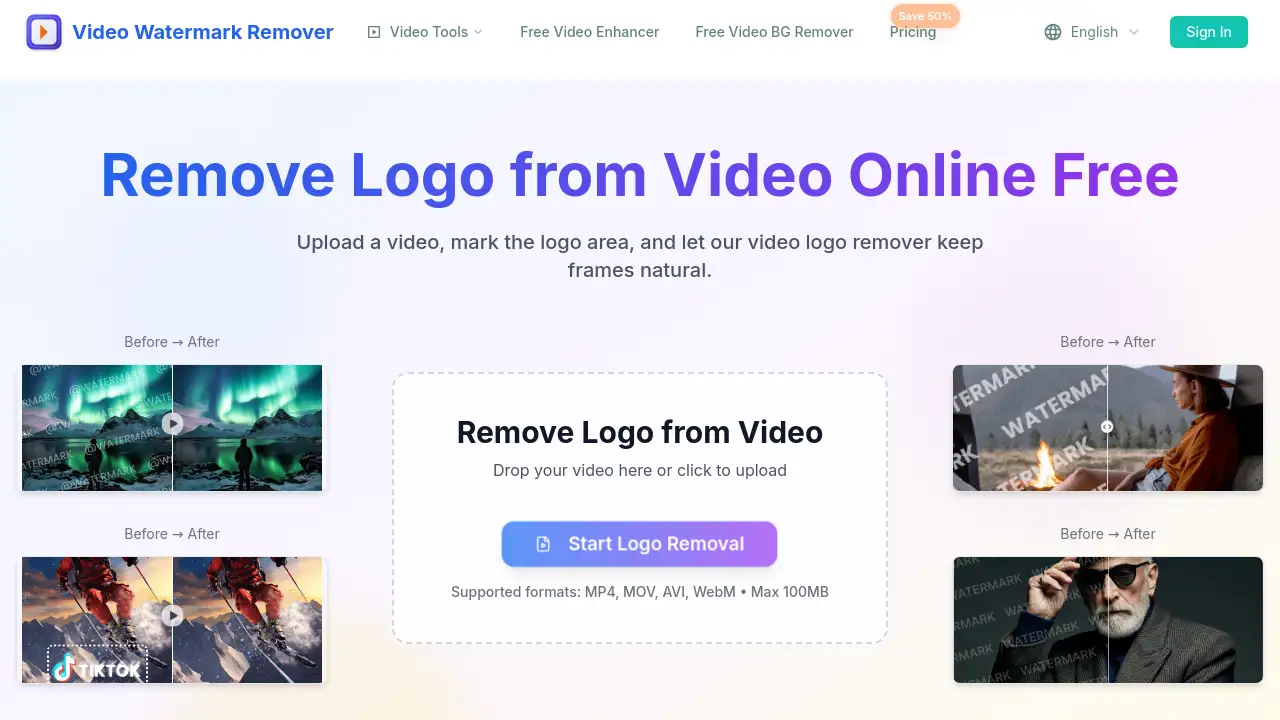
Remove Logo from Video removes logos with AI. This online video logo remover helps users clean corner logos, channel badges, and brand marks from MP4, MOV, and WebM clips. Read on for a full review of features, use cases, pricing, and FAQs.
What is Remove Logo from Video?
Remove Logo from Video is a browser-based AI video logo remover. It solves the problem of unwanted logos and watermarks covering important content. Instead of opening a full video editor, users can remove logo from video online by drawing over the logo area. The AI then rebuilds the covered background while keeping frames clean and natural. This tool is suitable for content creators, marketers, and video editors who need a fast and simple way to remove logo from video without losing quality.
The platform supports MP4, MOV, AVI, and WebM files. The homepage mentions a maximum file size of 100MB and states that over 10,000 videos have been processed. The service also promotes private processing, with temporary files removed automatically after download. For anyone looking to remove watermark from video or a brand logo, this product offers a focused online workflow.
Key Features of Remove Logo from Video
Smart Logo Detection
The AI video logo remover focuses on the selected logo area and reconstructs background pixels across frames. This makes it possible to remove logo from video without obvious blur or smearing.
Fast Online Workflow
Upload, select, process, and download are the main steps. Users can remove logo from video online without installing software or learning complicated tools.
Clean Natural Frames
The tool is designed to remove logo from video while avoiding heavy blur, color patches, and ghost edges. This helps keep motion and textures intact.
Popular Video Formats
MP4, MOV, AVI, and WebM are supported. Users can remove logo from video using common browser-based workflows on desktop or mobile devices.
Private Processing
Files are processed securely, and temporary results are removed after download. This makes it safe to remove logo from video with sensitive or unreleased content.
No App Required
The video logo remover works on phones, tablets, and laptops without signing up. It is a quick way to remove logo from video anywhere.
Moving Logo Removal
The tool can handle logos that shift or fade across frames. Users can select a moving logo area and remove logo from video while AI rebuilds the covered pixels naturally.
Use Cases for Remove Logo from Video
Corner Logo Removal
The video logo remover cleans static brand logos in the corner while preserving nearby edges. Users often remove logo from video to make clips reusable on social platforms.
Channel Badge Cleanup
Channel badges, platform marks, and creator handles can be removed before republishing. This is a common reason to remove logo from video on repurposed footage.
Semi-Transparent Logo Repair
Low-opacity logo overlays can be cleaned without ghost outlines or dull patches. The AI video logo remover helps remove logo from video while keeping the background natural.
Product Demo Rebranding
Teams preparing product demos can remove logo from video to update old brand marks. This keeps the original message while refreshing the visual identity.
Marketing Asset Cleanup
Old campaigns often contain outdated logo overlays. Marketers can remove logo from video before reusing those assets in new promotions.
How to Use Remove Logo from Video
Using the tool is simple and requires only a few steps:
- Upload a video. Choose an MP4, MOV, AVI, or WebM file that contains a corner logo, channel badge, or watermark.
- Select the logo area. Draw over the logo overlay and let the AI video logo remover process the selected region.
- Preview the result. Check that the background looks clean and natural.
- Download the cleaned video. Save the processed file in the original quality.
This workflow makes it easy to remove logo from video online without a steep learning curve.
Target Audience for Remove Logo from Video
- Content creators who want to clean logos from short clips
- YouTubers and streamers looking to remove watermark from video overlays
- Video editors who need quick AI logo removal for client projects
- Marketing teams refreshing old campaign assets
- Business owners preparing product demos and internal videos
- Social media managers repurposing brand footage
Is Remove Logo from Video Free?
The homepage says "Remove Logo from Video Online Free" and shows a "Try Free Now" button. This means users can test the AI tool without paying upfront. The platform accepts files up to 100MB, which is enough for many short video clips.
For heavier use, the site has a Pricing page with a "Save 50%" offer, but exact plan details are not listed on the homepage. Users should visit the official pricing page for current rates and plan features.
| Plan | Price | Features |
|---|---|---|
| Free | $0 | Try basic video logo removal with file size limits |
| Paid | See pricing page | Higher limits and additional AI features for regular use |
Remove Logo from Video's Pros and Cons
| Aspect | Pros | Cons |
|---|---|---|
| Ease of use | No software install, simple online steps | Users must manually select the logo area |
| Video quality | AI reduces blur and ghosting | Results depend on the complexity of the background |
| File support | Works with MP4, MOV, AVI, WebM | Maximum file size is 100MB |
| Privacy | Secure processing and auto-deleted temporary files | No offline mode for sensitive files |
| Price | Free trial available | Full features likely require a paid plan |
Frequently Asked Questions about Remove Logo from Video
How do I remove a logo from a corner of a video?
Upload the video, use the selection tool to mark the corner logo, and let the AI video logo remover process the clip. After previewing, download the cleaned file.
Can AI remove transparent logos from video?
Yes. The platform is designed to clean semi-transparent logo overlays without leaving ghost outlines or color patches. The AI rebuilds the background behind the logo.
Will the video become blurry after logo removal?
The goal of this video logo remover is to avoid obvious blur. It reconstructs the covered pixels while keeping edges, textures, and motion natural. Some complex backgrounds may still require a second attempt.
Does it work on moving logos?
Yes. The tool can handle logos that shift or fade across frames, according to the homepage. Select the moving logo area and let AI rebuild the covered pixels.
Can I remove a TikTok, YouTube, or platform logo from video?
Yes, if the platform logo is an overlay and the video file is in a supported format. Upload the MP4, MOV, AVI, or WebM file and remove logo from video using the same selection process.
Is it safe to upload my video?
The website says files are processed securely and temporary results are automatically removed after download. Still, users should avoid uploading highly confidential videos to any online tool.
Remove Logo from Video Tags
remove logo from video, video logo remover, remove logo from video online, AI video logo remover, remove watermark from video, AI logo removal, remove corner logo from video, remove channel badge from video, remove brand mark from video, clean video overlay, online watermark remover, remove logo from MP4