Introduction
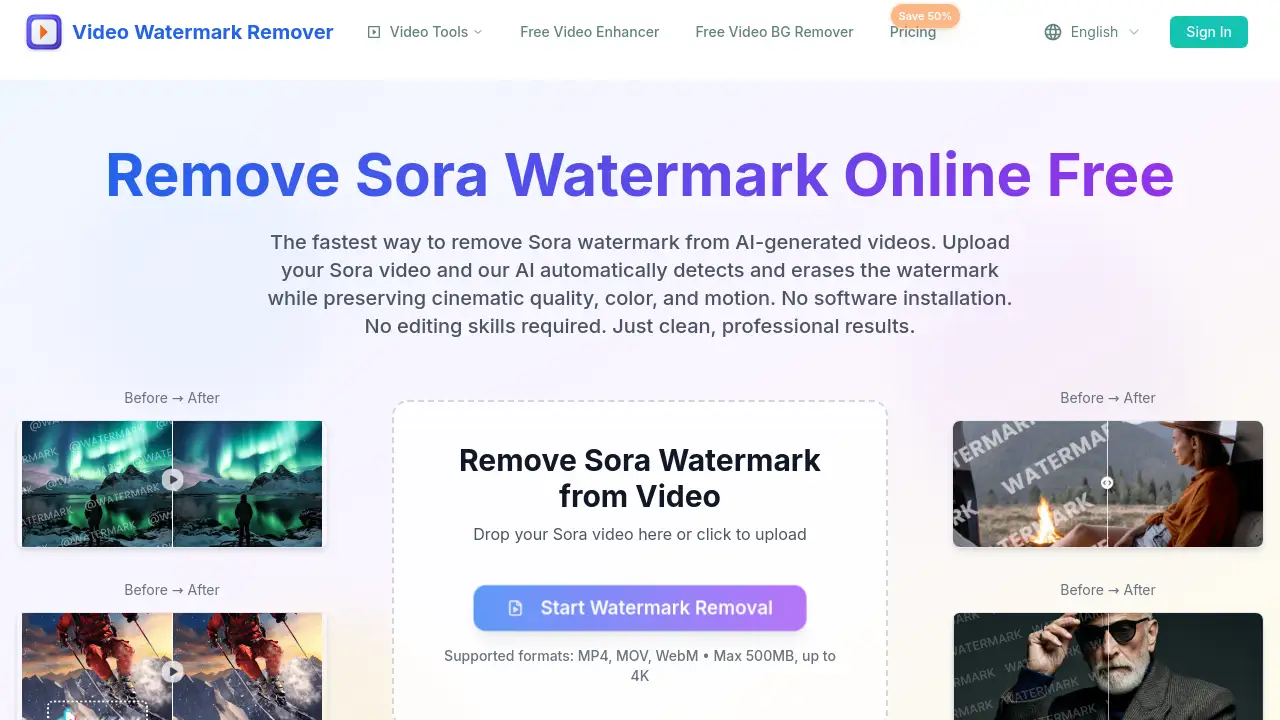
Remove Sora Watermark is a free online tool that helps users remove Sora watermark text and semi-transparent logos from AI-generated videos. It works as a dedicated Sora watermark remover for fast AI video watermark removal. The process runs entirely in a browser, so there is no software installation or editing experience required. Users can upload MP4, MOV, or WebM files and download clean Sora videos in seconds. For anyone looking for a quick way to remove Sora watermark marks, this product offers a simple AI-powered solution.
What is Remove Sora Watermark?
Remove Sora Watermark is an AI-powered web tool built specifically for videos created by OpenAI’s Sora model. Its main job is to remove Sora watermark overlays, including text labels, semi-transparent logos, and low-opacity marks that appear on AI-generated clips. This free Sora watermark remover matters because Sora videos often carry visible branding that can feel distracting in professional contexts. Instead of using complicated editing software, users can let the AI detect and erase the watermark while preserving the original scene. This makes the tool especially useful for content creators, video editors, and businesses that want to remove Sora watermark marks quickly and consistently. It also supports up to 4K resolution, so the output remains suitable for client projects and commercial use.
Key Features of Remove Sora Watermark
Sora-Specific Optimization
This tool is tuned to detect Sora watermark patterns and placement, which improves accuracy. Users can remove Sora watermark marks from different video formats without manual selection.
Frame Reconstruction AI
The AI rebuilds occluded pixels frame by frame, keeping edges, grain, and texture consistent. This helps remove Sora watermark overlays while maintaining natural motion and cinematic quality.
No Quality Loss
Original resolution, frame rate, and color space are preserved during processing. Anyone who needs to remove Sora watermark from 4K clips will not see unnecessary compression or blur.
Fast Quality Exports
Users can export clean videos in formats such as ProRes, DNxHR, and high-bitrate H.264. The fast processing makes this Sora watermark remover a practical option for tight deadlines.
Private & Online
All work happens in the browser, and uploaded files are deleted automatically after 24 hours. This gives users a secure way to remove Sora watermark without installing software.
Precise Mask Controls
Advanced tracking and manual keyframes let users target only the watermark area. Feather controls and saved presets help maintain detail around the watermark, making it easier to remove Sora watermark without affecting nearby elements.
Use Cases for Remove Sora Watermark
Content for Social Media
Short videos for TikTok, Instagram Reels, and YouTube Shorts look cleaner when the Sora text overlay is removed. Creators can remove Sora watermark before posting to keep the focus on the content.
Client Deliverables
Video editors often need clean footage for client projects. They can remove Sora watermark before delivery to present professional results without visible branding.
Portfolio and Demo Reels
Creators who want to showcase Sora AI videos in portfolios can remove Sora watermark while retaining original quality. This makes the work look polished and presentation-ready.
Personal Video Archiving
Even for personal use, it can be helpful to remove Sora watermark from videos before saving them. The tool makes it easy to store clean AI-generated clips without extra editing software.
How to Use Remove Sora Watermark
Follow these simple steps to remove Sora watermark from a video:
- Open the Remove Sora Watermark page in a web browser.
- Upload a Sora video in MP4, MOV, or WebM format. The tool supports files up to 500MB and up to 4K resolution.
- Let the AI detect the watermark. It will scan the video for Sora text overlays and semi-transparent logos.
- Preview the result. If needed, use mask controls to refine the removal area.
- Download the clean video. The exported file is ready for social media, client work, or personal use.
Target Audience for Remove Sora Watermark
- Sora AI video creators
- Social media managers
- Professional video editors
- Freelancers and digital agencies
- Marketing and content teams
- Educators and online course creators
- Anyone who wants to remove Sora watermark from AI-generated videos
Is Remove Sora Watermark Free?
Remove Sora Watermark is positioned as a free online tool. According to the official product page, users can upload a Sora video and let AI remove Sora watermark automatically in seconds. There is no indication of a paid plan in the reference information. The tool includes secure processing and automatic file deletion after 24 hours. For the most up-to-date pricing details, users should check the official website.
| Plan | Price | Features |
|---|---|---|
| Free | $0 | AI Sora watermark removal, browser-based processing, supports MP4/MOV/WebM, up to 4K, automatic file deletion after 24 hours |
Remove Sora Watermark's Pros and Cons
| Aspect | Pros | Cons |
|---|---|---|
| Pricing | Free to use, no installation cost | No paid plan details are available |
| Ease of Use | Simple upload-to-download process | Requires an internet connection |
| Features | Sora-specific AI, frame reconstruction, 4K export | Max file size is limited to 500MB |
| Privacy | Files are auto-deleted after 24 hours | Users must upload content to an online service |
Frequently Asked Questions about Remove Sora Watermark
Is Remove Sora Watermark really free?
Yes, the product is described as a free online tool. Users can upload Sora videos and remove Sora watermark without paying. No paid plan is mentioned on the official page.
Will removing the Sora watermark lower video quality?
No, the tool is designed to preserve original resolution, frame rate, and color space. It uses frame reconstruction AI to avoid blur, ghosting, and artifacts, so users can remove Sora watermark from videos while keeping 4K sharpness.
What video formats can I upload?
Remove Sora Watermark supports MP4, MOV, and WebM files. The upload limit is 500MB, and the tool supports videos up to 4K resolution.
Do I need to install software?
No, Remove Sora Watermark works directly in a browser. This free Sora watermark remover can be accessed from any device with an internet connection.
Is my video private when I upload it?
The processing is secure, and files are automatically deleted after 24 hours. As with any online tool, users should be cautious about uploading sensitive content.
Can I use the cleaned videos commercially?
According to the product page, the tool is suitable for client projects, portfolio work, and commercial use. It helps remove Sora watermark while maintaining clean, professional results.
Remove Sora Watermark Tags
Remove Sora Watermark, Sora watermark remover, remove watermark from Sora video, Sora AI videos, free Sora watermark remover, erase Sora text overlay, Sora video clean up, AI video watermark removal, remove Sora logo, Sora video online tool