Double your research efficiency: A step-by-step guide to using NotebookLM for in-depth research.

In this age of information overload, researchers, students, and knowledge workers face a common challenge: how to quickly digest vast amounts of literature, extract key information, and generate valuable insights? Google's NotebookLM is an intelligent research tool designed to address this pain point. It deeply integrates AI capabilities into the knowledge workflow, enabling a qualitative leap in research efficiency.
01 NotebookLM: More Than Just a Note-Taking Tool, It's Your Research Co-pilot
NotebookLM's core positioning is "an interactive AI research and analysis engine based on your own knowledge base." Unlike traditional note-taking tools, NotebookLM doesn't focus on recording and formatting from scratch; instead, it emphasizes analyzing and processing the materials you provide.
Its two key technological strengths enable its outstanding performance in the research field:
-
Source-Grounded Technology: All answers in NotebookLM must be based on your uploaded materials, and every point of view will clearly indicate the source, greatly reducing the problem of AI "illusion".
-
Superior Context Processing Capabilities: It can simultaneously "read and remember" up to 2 million tokens (approximately 1.5 million words) of content, and can analyze dozens of PDF reports at once.
02 Step-by-Step Guide: Starting with Creating Your First Research Notebook
Access and Initialization
Visit https://notebooklm.google.com/ and log in with your Google account to use it for free. Click "Create New" to create your research notebook.
Uploading Research Materials
NotebookLM supports various research material formats:
-
PDF Documents: Upload academic papers and research reports
-
Web Links: Add related articles and online resources
-
Video Content: Analyze video content via YouTube links
-
Audio Files: Process interview recordings and meeting minutes
-
Text Documents: Supports PDF, TXT, Markdown, and other formats
-
Efficient Techniques: Batch upload up to 50 documents on related topics to a single notebook for easy cross-analysis and comprehensive research.
03 In-Depth Research Practice: Four Scenarios and Application Techniques
Literature Review and Knowledge Organization
When facing a new field, NotebookLM can help you quickly build a knowledge system:
-
Automatic Research Overview Generation: After uploading multiple documents, NotebookLM will automatically generate abstracts and extract key themes.
-
Intelligent Question Answering for Deeper Understanding: Ask questions targeting specific content, such as "What are the innovative aspects of the research methods?" or "What are the limitations of the experimental design?"
-
Building a Knowledge Timeline: Requires the generation of a timeline to trace the development of the research field.
-
Advanced Techniques: Through a "broad to narrow" questioning strategy, first understand the overall overview, then delve into the details.
Cross-analysis and Insightful Discovery
NotebookLM's true advantage lies in its ability to connect related concepts across documents: Example Questions
- "What are the similarities and differences in the research methods of these papers?"
- "What controversial or contradictory viewpoints exist in these studies?"
- "In which studies has Theory A been verified or challenged?" The system will provide comprehensive answers based on all uploaded literature, accurately marking the source locations. Clicking on the citation will allow you to view the original text.
Multiple Output Formats to Meet Diverse Needs
NotebookLM offers multiple content output formats to aid in organizing research findings:
-
Research Abstracts: Quickly generate abstracts of core literature content.
-
Mind Maps: Visualize knowledge structures and conceptual connections.
-
Frequently Asked Questions (FAQs): Generate FAQs based on materials for quick review.
-
Audio Podcasts: Convert content into audio for easy learning during commutes.
Paper Writing Assistance
NotebookLM can serve as a powerful paper writing assistant:
-
Generate Literature Review Drafts: Automatically generate initial review drafts based on uploaded literature.
-
Extract Research Methodology Descriptions: Help summarize the research methods of various documents for easy comparison and citation.
-
Check Citation Accuracy: Ensure every argument is supported by relevant literature through the source citation function.
04 Advanced Techniques to Improve Research Efficiency
Precise Questioning Strategies
The key to effective interaction with NotebookLM lies in asking specific and clear questions:
-
Inefficient Questioning: "Analyze these documents"
-
Effective Questioning: "Compare the research methods of these three papers, and list their respective advantages, disadvantages, and applicable scenarios."
Using a "role-playing" approach to ask questions is even more effective, such as: "Assuming you are a domain expert, please identify three major gaps in current research based on these documents."
Multimodal Data Integration
NotebookLM supports the integration and analysis of multiple data types, such as:
-
Uploading academic papers (PDFs), expert lecture videos (YouTube links), and related blog articles (web links) in a specific field to the same notebook.
-
Requesting AI to generate a comprehensive overview based on all these materials.
Iterative Deep Research
Utilizing NotebookLM's "output-to-input" function, build an iterative research cycle:
-
Upload original documents and generate preliminary abstracts.
-
Save high-quality abstracts as notes and add them as new sources.
-
Conduct deeper analysis based on original documents and abstract notes.
This method enables continuous refinement and deepening of knowledge.
05 Precautions and Best Practices
While NotebookLM is powerful, please note the following:
*. Always verify key information: AI-generated content is for reference only. Important information (especially data and formulas) must be verified against the source documents.
*. Understand functional limitations: It may not perform well on complex reasoning tasks. It is recommended to break down large topics into sub-topics and handle them separately.
*. Pay attention to privacy protection: Avoid uploading highly confidential or sensitive materials.
*. Save important content promptly: Chat history is not saved by default. Useful information should be saved promptly by clicking "Convert to Notes".
06 Real-world research case demonstration
Suppose you are researching "the impact of climate change on agriculture", you can use NotebookLM as follows:
*. Data collection: Upload 10-20 relevant academic papers, 2 international organization reports, and 1 expert lecture video.
*. Initial exploration: Let NotebookLM generate a field overview to identify key issues and points of contention.
*. In-depth analysis: Conduct cross-literature comparisons on the specific question of "the effectiveness of climate change adaptation strategies".
*. Results Compilation: Mind maps were generated to illustrate the connections between various strategies, and briefings were created for team discussion.
Conclusion: Towards a New Paradigm of Human-Machine Collaboration in Research
NotebookLM represents an important development direction for AI-assisted research. It is no longer a simple information storage tool, but a true research partner capable of understanding content, organizing structure, and assisting innovation. Through the methods and techniques introduced in this article, you can significantly improve research efficiency and devote more energy to creative work.
Most importantly, superior research ability lies in asking the right questions, not in possessing all the answers. NotebookLM is precisely such a tool; it enhances, rather than replaces, your research expertise.
Start your efficient research journey now! Create your first NotebookLM notebook and experience firsthand how AI can change the way you process knowledge.
Citation: https://notebooklm.google/
Leave your comment
- No comments yet.
Recommended AI Tools
Carefully selected AI tools to improve your work, study, and live efficiency.

Related Articles
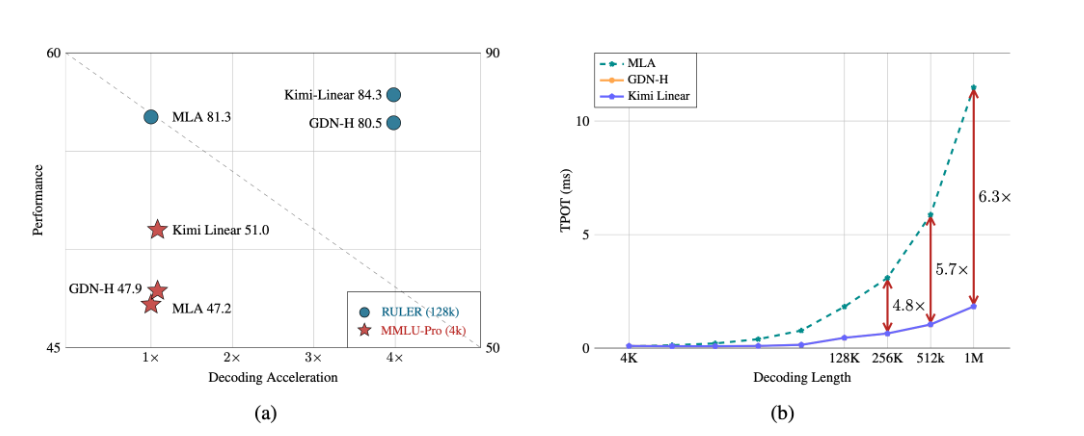
A major breakthrough has been achieved in the core architecture of large-scale models! The release of Kimi Linear marks the first time that linear attention technology has comprehensively surpassed and significantly outperformed the traditional Transformer full-attention model in both performance and efficiency. This "win-win" achievement is expected to significantly reduce the computational barriers and costs for long text processing, complex reasoning, and AI agent applications, potentially changing the competitive landscape of underlying technologies for large-scale models.

Over the past week, the AI community's attention has been drawn to a mysterious model that quietly emerged on the OpenRouter platform—Polaris Alpha. As a direct continuation of yesterday's discussion of the GPT-5.1 leak, this suddenly appearing model brings more technical details and strategic signals worthy of in-depth exploration.
Alibaba open-sources Qwen-Image-2.1: a 7B unified image model with native RGBA transparency and 10-reference editing.