Introduction
Copy Video AI is a video to prompt AI tool that transforms existing video references into detailed, reusable prompts for AI video generation.
What is Copy Video AI?
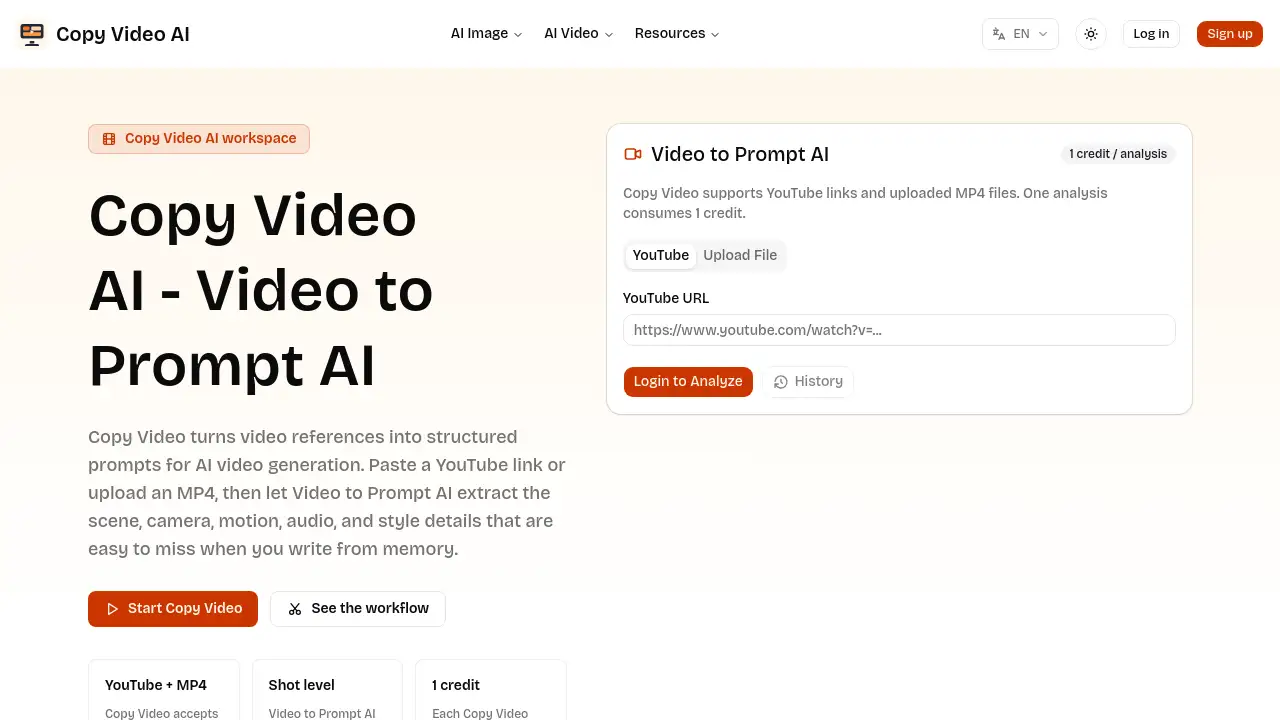
Copy Video AI is a specialized tool designed to bridge the gap between inspiration and creation. It solves a common problem for creators and marketers: seeing a video with a compelling style, pace, or structure but struggling to articulate those elements into a coherent prompt for an AI video generator. This product analyzes a video source, whether from a YouTube link or an uploaded MP4 file, and extracts the core production language. It then structures these details into a clear, production-ready brief. This process is crucial because effective AI video prompting requires more than just describing the subject; it needs specifics about camera movement, scene composition, lighting, pacing, and audio cues. Copy Video AI automates this analysis, saving time and providing a structured foundation that can be adapted and reused across various projects and teams.
Key Features of Copy Video AI
Video to Prompt AI Analysis
The core feature is its AI-driven analysis that deconstructs a reference video, identifying and describing key visual and auditory components to create a structured prompt.
YouTube Link and MP4 Upload Support
Users can analyze both public content by pasting a YouTube link and private work-in-progress by uploading MP4 files directly, offering flexibility for different workflows.
Production Language Extraction
The tool goes beyond transcription by extracting visible production details like camera framing, subject motion, environmental style, lighting, and transitions, turning them into descriptive language.
Reusable Prompt Generation
It outputs a clear, structured text prompt that can be copied, edited, and reused in various AI video generation tools, serving as a foundational creative brief.
Prompt Library Building
By analyzing multiple videos, teams can create a searchable library of prompts categorized by genre, pacing, or platform, ensuring consistency in video production vocabulary.
Use Cases for Copy Video AI
Creators Studying Viral Edits
Creators can use the tool to deconstruct successful videos, understanding the specific elements like hooks, pacing, and transitions that make them work, and convert those insights into a prompt structure.
Marketers Rebuilding Winning Concepts
Marketing teams can analyze competitor ads, product demos, or successful UGC to create a prompt that captures the original strategy, allowing for adaptation to a new brand or product offer.
Editors Creating Prompt Libraries
Video studios and editors can build internal libraries of production-ready prompts by analyzing a diverse set of reference videos, streamlining the briefing process for new projects.
Founders Testing Video Directions
Startups and founders with a visual reference for their desired video style can use the tool to generate a concrete, testable prompt to experiment with AI video generation tools quickly.
How to Use Copy Video AI
- Access the Tool: Navigate to the Copy Video AI workspace on their website.
- Provide a Video Reference: Either paste a public YouTube link into the provided field or upload a private MP4 video file from your device.
- Initiate Analysis: Click the "Start Copy Video" or equivalent button to let the Video to Prompt AI analyze the video content.
- Review the Output: The tool will generate a structured prompt detailing scenes, camera work, motion, style, and audio cues from your reference.
- Copy and Adapt: Copy the generated prompt text. You can then use it directly, edit it for your specific needs, or save it to a prompt library for future AI video generation.
Target Audience for Copy Video AI
- Video Creators and Content Strategists
- Digital Marketers and Social Media Managers
- Video Editors and Production Studios
- Startup Founders and Product Teams
- Advertising and Creative Agencies
- Educators and Course Creators
Is Copy Video AI Free?
Based on the available reference information, specific pricing details are not provided on the homepage. The product appears to offer a free generator tool directly on the homepage for users to try. For detailed information on any premium plans, features, or usage limits, users should visit the official Copy Video AI website.
Copy Video AI's Pros and Cons
| Aspect | Pros | Cons |
|---|---|---|
| Workflow | Saves significant time by automating video analysis and prompt writing. | Relies on the quality and clarity of the input reference video. |
| Output Quality | Creates detailed, structured prompts that are more actionable than manual descriptions. | The generated prompt may require minor editing to perfectly fit a specific AI tool's syntax. |
| Accessibility | Simple interface; users only need a video link or file to start. | Pricing structure for advanced or team use is not clearly stated on the homepage. |
| Versatility | Useful for a wide range of professionals from creators to marketers. | Primarily a bridging tool; requires an AI video generation platform to create the final output. |
Frequently Asked Questions about Copy Video AI
What does Copy Video AI do?
Copy Video AI analyzes an existing video reference and turns the visible production details—like scene structure, camera angles, motion, and style—into a reusable, structured text prompt for AI video generation tools.
Is Copy Video AI only for YouTube links?
No, the Video to Prompt AI feature works with both YouTube links and uploaded MP4 files. This allows analysis of both public examples and private footage, client work, or internal edits.
How is Copy Video AI different from a transcript tool?
A transcript tool only captures spoken words. Copy Video AI analyzes the visual and production language—how the video is shot, edited, and styled—to create a prompt that describes the construction of the video, not just its dialogue.
Can I reuse the generated prompt in other AI video tools?
Yes. The tool outputs plain, structured text. This Video to Prompt AI result can be copied directly into various AI video generation platforms, edited for a new context, or saved as part of a personal or team prompt library.
Who should use Copy Video AI?
Copy Video AI is useful for anyone who starts their creative process with a video reference. This includes creators, marketers, editors, agency teams, and founders who want to translate a visual example into an executable brief for AI video creation.
What kind of details does the Video to Prompt AI extract?
The analysis typically separates and describes elements such as the subject, environment, camera movement, pacing, lighting, audio cues, and transition notes observed in the reference video.
Copy Video AI Tags
video to prompt AI, copy video AI, AI video prompt generator, YouTube to prompt, MP4 to prompt, video analysis tool, AI video creation, reusable video prompts, prompt library for video, video production brief, creative workflow tool, AI video generation assistant, video reference analyzer, marketing video prompts