Introduction
Free Fax Desk is a free Windows app that turns a Phone.com digital fax number into a smart office inbox. Free Fax Desk helps small offices name senders, assign faxes, block spam, and send faxes from a PC. This review explains how Free Fax Desk works, who it suits, and what it costs.
What is Free Fax Desk?
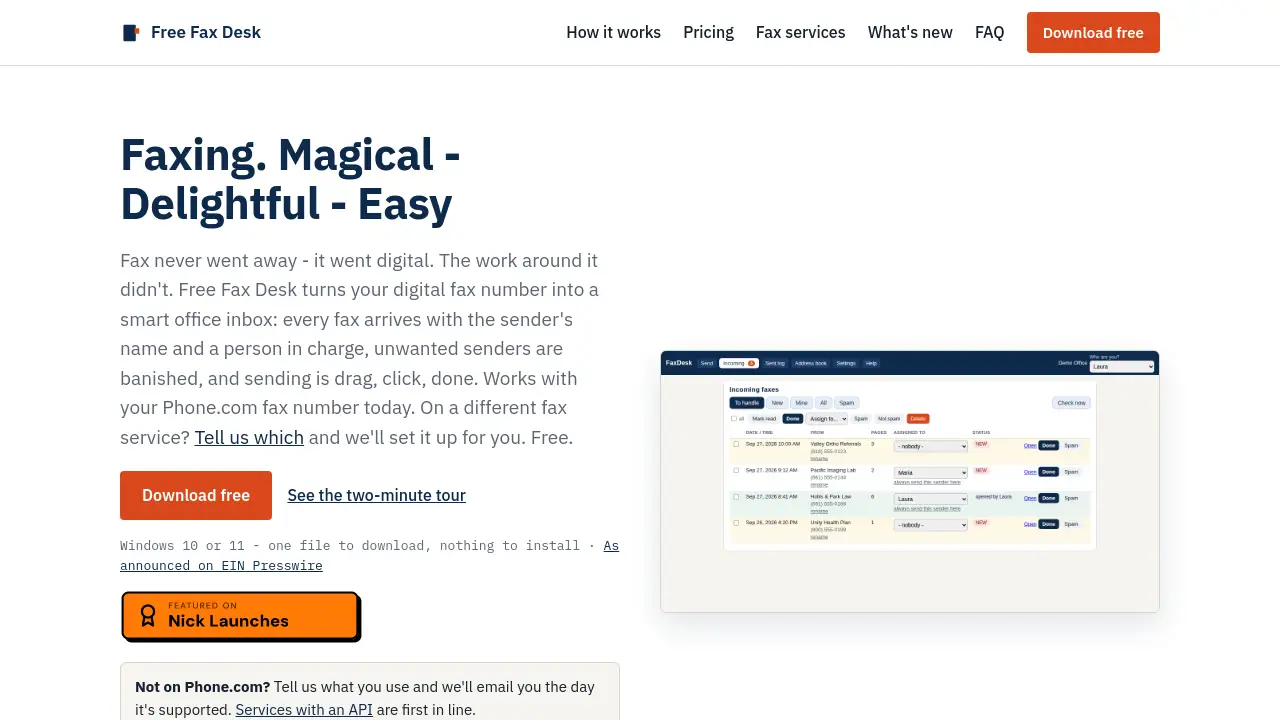
Free Fax Desk is a desktop fax management tool built for offices that still rely on fax for referrals, records, authorizations, and signatures. Instead of treating each incoming fax as a strange phone number, Free Fax Desk turns a Phone.com fax line into a named, owned, and trackable digital fax inbox. Every fax arrives with a date and time, and once a sender number is named, that name appears on future faxes. Users can assign a fax to a person with one click, set rules for regular senders, and see whether a document has been handled. The product also supports sending: choose a PDF, pick a number from an address book, and confirm. A cover page can be added automatically, failed sends retry, and each send creates a confirmation PDF with the transmission report and cover page. Free Fax Desk is made by Frye Chiropractic, a clinic in Lancaster, California, and published by HnS, LLC under the MIT licence. It is open source, local-first, and free for one PC. For small healthcare, legal, accounting, and service offices, Free Fax Desk addresses a practical problem: fax went digital, but the work around it did not.
Key Features of Free Fax Desk
Named Sender Recognition
Free Fax Desk lets users name a fax number once, so every later fax from that number shows the sender’s name. This makes a digital fax inbox easier to scan and prioritize.
One-Click Fax Assignment
Free Fax Desk assigns an incoming fax to a person in one click, and it appears as theirs. Set a rule so a regular sender always goes to the right desk, which reduces “someone should handle this” delays.
Automatic Cover Pages and Send Proof
When sending, Free Fax Desk can add a cover page with a logo and disclaimer. Every send produces one PDF that combines the transmission report and cover page, giving clear proof that a fax was sent.
Spam Sender Blocking
Free Fax Desk blocks unwanted senders with one click and unblocks them just as easily. This keeps a busy fax inbox focused on referrals, records, and other important documents.
Local Privacy and Retention Controls
Free Fax Desk keeps faxes on the PC, with no cloud account required. Users can set retention days for incoming and outgoing faxes, and a daily backup folder is kept on the same machine.
Phone.com Integration and Open Source Code
Free Fax Desk works with an existing Phone.com fax number today. The app is a single EXE with no installer, and the code is open source under the MIT licence for anyone to review.
Use Cases for Free Fax Desk
Healthcare Front Desks
Clinics receive referrals, records, and authorizations by fax every day. Free Fax Desk helps front desk teams name senders, assign documents, and prove that a fax was sent.
Legal and Accounting Offices
Law firms and accounting practices often need reliable fax records. The Free Fax Desk digital fax inbox and confirmation PDFs provide an organized way to track incoming and outgoing faxes.
Small Business Offices
Any small office using a Phone.com fax line can use Free Fax Desk to reduce manual sorting. Free Fax Desk is designed for one PC first, with a whole-office option for networked teams.
Property Management and Real Estate
Property managers and real estate offices handle leases, applications, and signatures. Free Fax Desk keeps those faxes named, owned, and searchable on a Windows PC.
How to Use Free Fax Desk
- Download Free Fax Desk from the official release page. It is one file for Windows 10 or 11, and no installer is required.
- Paste a Phone.com API key into the setup screen. The official guide walks through this once, usually in about ten minutes.
- Open the fax inbox and begin naming senders, assigning faxes, and blocking unwanted numbers.
- Send faxes by choosing a PDF, selecting a number from the address book, and confirming. The confirmation PDF lands in the log.
- Set retention days and check the daily backup folder on the same PC.
Target Audience for Free Fax Desk
- Healthcare clinics and medical front desks
- Legal, accounting, and tax practices
- Small businesses using Phone.com fax numbers
- Office managers who handle faxes daily
- Windows users who want a local-first fax inbox
- Teams that need a shared office fax inbox
Is Free Fax Desk Free?
Free Fax Desk is free for one PC. The paid option is for offices that want every desk on an office network to share one inbox.
| Plan | Price | Features |
|---|---|---|
| Free | $0 | Every feature on one PC; no page limits, no time limit, no nag; open source, MIT |
| Whole office | $99 one time | Every desk on office network, one inbox; name picker, assign, per-person views; nothing to install on other desks; free updates |
Free Fax Desk's Pros and Cons
| Aspect | Pros | Cons |
|---|---|---|
| Pricing | Free for one PC; whole-office plan is a one-time $99 | Paid shared inbox requires a licence |
| Features | Named senders, assignment, spam blocking, send proof, retention controls | Requires a Phone.com account today |
| Privacy | Faxes stay on the PC; no cloud account, telemetry, or update checks | HIPAA compliance depends on the office’s own setup and Phone.com BAA |
| Platform | Works on Windows 10 and 11; open source | No packaged Mac app yet |
| Setup | One-file download, no installer, ten-minute Phone.com key setup | SmartScreen warning may appear for unsigned releases |
Frequently Asked Questions about Free Fax Desk
Do I need a Phone.com account to use Free Fax Desk?
Yes, today. Free Fax Desk is built and tested with Phone.com fax numbers. Other services are listed as coming, and users can request their provider.
Is Free Fax Desk secure?
The token is stored sealed to the Windows account. Faxes are files on the PC, and Free Fax Desk says it never sends anything anywhere except to Phone.com to fax. There is no cloud account, telemetry, or update check.
Is Free Fax Desk HIPAA compliant?
No software is HIPAA compliant by itself. Free Fax Desk keeps faxes on the user’s PC and adds no third party, so the Business Associate Agreement stays between the office and Phone.com. Retention days should be set to match office policy.
Can several people use Free Fax Desk?
On one PC, yes: users can pick their name and work. To use the same inbox from other desks, the whole-office key turns on the office-network switch, and other desks open the same page in a browser.
Does Free Fax Desk work on a Mac?
Not yet as a packaged app. It is plain Python, so it can run on a Mac from source using FaxDesk.command in the download. A packaged Mac app may come later.
Is Free Fax Desk really free?
Yes. Every feature is free on one PC, with no page limits, no time limit, and no nag. The only paid option is the whole-office plan at $99 one time per office.
Free Fax Desk Tags
Free Fax Desk, free fax software, digital fax inbox, Phone.com fax, fax management software, send fax from PC, open source fax software, small office fax, HIPAA fax, Windows fax app, fax inbox for healthcare, fax assignment software