Introduction
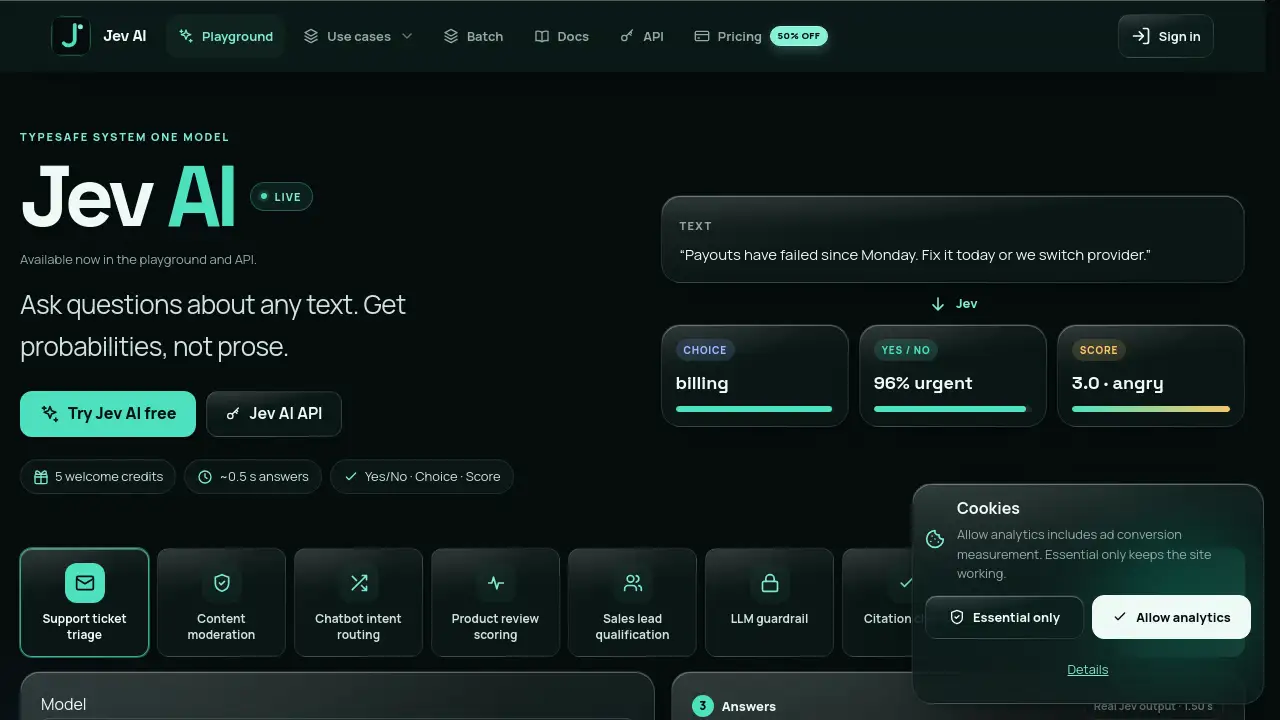
Jev AI is a browser playground and API for the Jev model. It is TypeSafe’s first System One model, designed to answer typed questions about text and return calibrated probabilities instead of prose. Users can test yes/no, choice, and score questions in the Jev AI playground, then call the same Jev AI API with their own key. The tool focuses on fast structured decisions rather than long-form writing.
What is Jev AI?
Jev AI is an independent playground and API for Jev, the System One model from TypeSafe. It solves a common problem in AI workflows: many applications do not need generated paragraphs; they need labels, probabilities, choices, and scores that code can branch on. Jev AI provides these typed answers with calibrated confidence.
The Jev model evaluates many narrow questions about one piece of text in parallel. Instead of asking a model to “explain” a document, users can ask precise yes/no, choice, or score questions. Jev AI returns probabilities and confidence values, making it easier to build decision logic, evaluate AI agents, route requests, and check retrieved context.
Jev AI is suitable for developers, data teams, support operations, and AI product builders who need fast, structured decisions from text. It matters because it turns unstructured content into typed signals that can be used directly in software.
Key Features of Jev AI
Typed Answers for Code
Jev AI returns numbers and labels that applications can branch on. This makes it useful for routing, scoring, and judgment tasks where prose output is not practical.
Calibrated Confidence
Every answer from the Jev model carries a confidence value. Users can see how sure the model is and set thresholds for automated decisions.
Multiple Question Types
Jev AI supports Yes/No, Choice, and Score questions. These three formats cover binary checks, category selection, and custom rating scales.
Many Questions, One Call
The Jev AI API can answer many questions about one text in parallel. This reduces complexity and keeps structured decisions in a single request.
TypeSafe-Compatible API
The Jev AI API uses the same JSON shape as TypeSafe requests, including state, model, and questions. Developers can send requests to the Jev AI endpoint with their own API key.
Fast Playground
The Jev AI playground runs in the browser and returns answers quickly, often around 0.5 seconds. It includes welcome credits so new users can test the Jev model before building.
Use Cases for Jev AI
AI Agent Evaluation
Jev AI can judge whether an AI agent followed rules or answered correctly. This makes it useful for automated evaluation of agent behavior and output quality.
Entity Matching
Teams can use Jev AI to compare records, names, or descriptions and ask whether they refer to the same entity. The calibrated probabilities help set match thresholds.
Live Web Context
Jev AI can check retrieved context from web pages or documents. Users can ask yes/no questions about relevance, freshness, or suitability before passing content into another system.
Customer Support Routing
Support teams can classify tickets by billing, technical, sales, or account category. Score questions can also measure frustration or urgency before a human responds.
Content Review and Scoring
Editors and moderators can rate text on custom levels, such as calm, mildly annoyed, frustrated, or angry. Jev AI returns a score with confidence for each judgment.
How to Use Jev AI
- Open the Jev AI playground in a browser and review the available example cases.
- Paste plain text or JSON into the text field. Jev AI accepts text only, so images and PDFs must be converted first.
- Add yes/no, choice, or score questions about the text.
- Run Jev AI and review the typed answers, probabilities, and confidence values.
- Create an API key on the Jev API page and send the same JSON structure to the Jev AI endpoint for production use.
Target Audience for Jev AI
- AI developers building agents, evaluators, or decision systems
- Data and ML teams needing structured labels from text
- Customer support and operations teams routing requests
- Product teams testing AI behavior with calibrated confidence
- Researchers and analysts scoring text on custom scales
- Businesses that need an API-first alternative to prose generation
Is Jev AI Free?
Jev AI offers free welcome credits for eligible new accounts. Paid usage is based on input tokens, and output tokens are free. Web tools use credits first, then input tokens if credits run out. API calls use input tokens first, then 1 credit if tokens are insufficient. A request never charges both accounts.
| Plan | Price | Features |
|---|---|---|
| Welcome | $0 | 5 welcome credits, playground access, API testing, daily check-in gifts may add credits |
| Paid usage | See official pricing page | Input tokens only, monthly plans or one-time purchases, output tokens free |
| API access | Included with account | Same JSON shape as TypeSafe, endpoint at /api/v1/systemone, tokens first then 1 credit fallback |
Pricing details are available on the official Jev AI pricing page.
Jev AI's Pros and Cons
| Aspect | Pros | Cons |
|---|---|---|
| Features | Typed answers, calibrated confidence, yes/no, choice, and score questions | Focused on structured decisions, not text generation |
| Speed | Fast playground responses, often around 0.5 seconds | Actual speed may vary by request size |
| API | TypeSafe-compatible request shape and many questions per call | Requires API key setup for production use |
| Pricing | 5 welcome credits and free output tokens | Paid token and credit rules can take time to understand |
| Input | Works with plain text, JSON objects, and arrays | Cannot read images or PDFs directly |
| Language | English is the primary and most accurate language | Other languages work but may be less reliable |
Frequently Asked Questions about Jev AI
What is Jev AI?
Jev AI is a playground and API for Jev, the System One model from TypeSafe. It lets users ask typed questions about text and receive probabilities, choices, scores, and confidence values.
What is the TypeSafe System One model?
The TypeSafe System One model is Jev. It is trained for fast structured decisions instead of prose generation, evaluating many narrow questions about one state in parallel.
Can Jev AI read images or PDFs?
No. Jev AI accepts text only, including strings, JSON objects, or arrays. Images and PDFs must be converted to text or structured fields before being sent.
Which languages does Jev AI support?
English is Jev AI’s primary language and where it is most accurate. Other languages can work, but results may be less reliable, so testing on your own data and watching confidence is recommended.
How does the Jev AI API work?
Create an API key on the Jev API page and send the same JSON used for TypeSafe requests. The request includes state, model, and questions, and it is sent to the Jev AI endpoint at /api/v1/systemone.
How much does Jev AI cost?
Eligible new accounts get 5 welcome credits. Paid usage charges input tokens only, and output tokens are free. Web tools use 1 credit per request, then input tokens if credits run out. API calls use tokens first, then 1 credit if tokens are insufficient.
Jev AI Tags
Jev AI, Jev model, TypeSafe System One model, Jev AI API, Jev AI playground, calibrated probabilities, confidence scores, yes/no questions, choice questions, score questions, AI agent evaluation, entity matching, live web context, structured decisions