Introduction
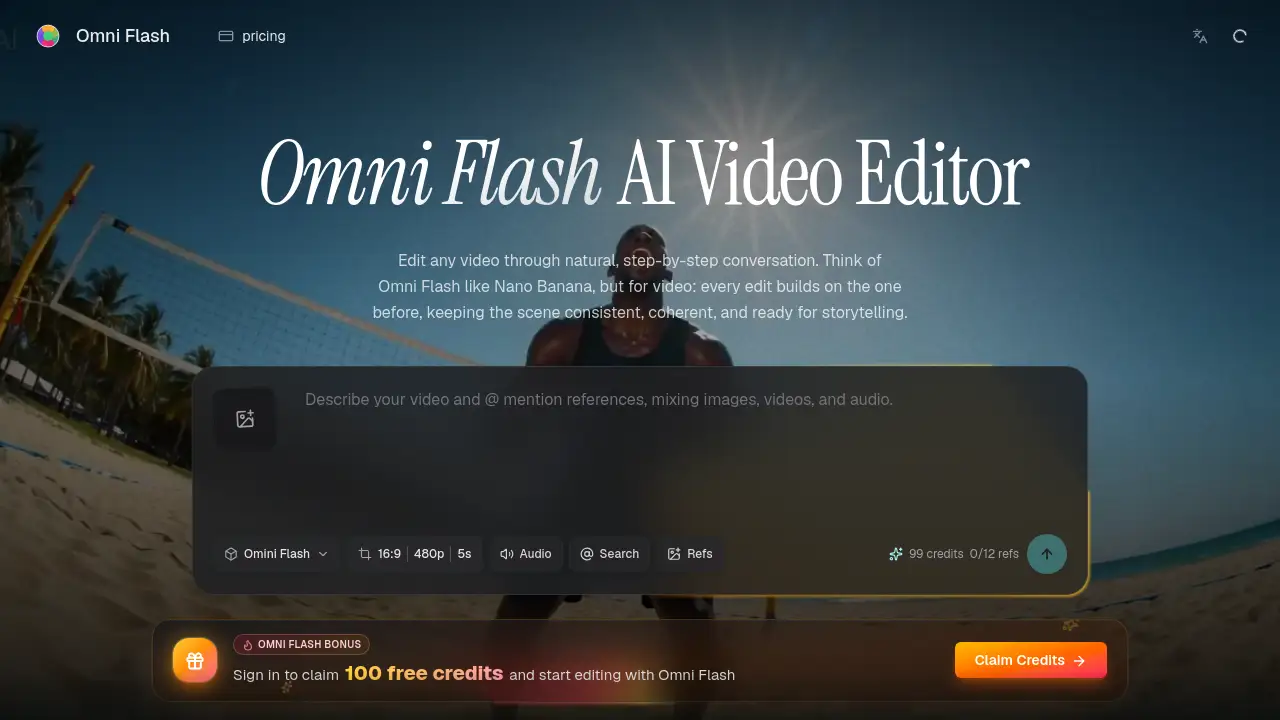
Omni Flash is a conversational AI video editor for natural, step-by-step scene building.
What is Omni Flash?
Omni Flash is an AI-powered video editing platform that allows users to edit videos through natural language conversation. Unlike traditional one-shot video generators, Omni Flash focuses on conversational video editing, where each edit builds upon the previous one, maintaining scene consistency and coherence across multiple turns. It solves the problem of disjointed, inconsistent edits in AI video creation by allowing for controllable, step-by-step refinement. This tool is suitable for video creators, marketers, storyboard artists, and filmmakers who need precise control over their edits, want to swap characters or objects, or combine various references into a single, cohesive narrative.
Key Features of Omni Flash
Multi-Turn Conversational Editing
Users can craft a scene step-by-step by describing a series of edits in plain language, with each new instruction building on the last while keeping the video world coherent.
Reference-Driven Object & Character Swap
Replace characters or objects in a video simply by asking, optionally using a reference image to guide the new look while preserving the original motion, dialogue, and scene timing.
Multi-Modal Input Integration
Combine prompts with various inputs like images, videos, audio clips, style references, or motion cues, and Omni Flash will merge them into one compelling, unified output instead of a collage.
Physics and World-Aware Edits
The AI is designed to understand real-world logic, including physics like gravity and fluid dynamics, as well as historical, scientific, and cultural context for more believable and grounded video edits.
Consistent Scene Coherence
The core differentiator is its ability to maintain character, object placement, lighting, and overall scene continuity throughout a long editing session, ensuring the final video feels like one continuous piece.
Use Cases for Omni Flash
Marketing & Brand Video Production
Marketing teams can iteratively refine promotional videos, ensuring brand style consistency and making precise adjustments to characters, messaging, or on-screen text through simple conversation.
Film Pre-Visualization & Storyboarding
Filmmakers and storyboard artists can quickly visualize scenes by uploading sketches and references, then iterating on action, camera angles, and character placement to finalize a shot list.
Content Repurposing & Localization
Content creators can efficiently swap out elements in existing videos, such as changing a presenter or translating on-screen text, for different regional audiences while keeping the core scene intact.
Creative Experimentation & Visual Effects
Independent creators and motion designers can experiment with spectacular transformations, style transfers, or adding complex visual effects to real footage using natural language prompts and references.
How to Use Omni Flash
Using Omni Flash for conversational video editing is a straightforward, four-step process designed to mimic a natural creative dialogue.
- Upload Your Source: Begin by uploading a source video, image, audio cue, or even a text brief. You can also add reference images or videos at this stage for more control.
- Describe Your Edit: In the chat interface, describe the change you want. This could be altering the action, swapping a character, changing the style, adjusting the camera angle, or adding an effect.
- Refine Through Conversation: Review the result and then ask for your next edit. For example, "Now make the sky sunset" or "Replace that car with a bicycle." Each turn builds on the last, maintaining scene coherence.
- Export Your Video: Once satisfied with the edited scene, export the final, polished video output that incorporates all your conversational instructions and references.
Target Audience for Omni Flash
- Video Marketers & Social Media Managers who need to produce and adapt video content quickly.
- Independent Filmmakers & Video Creators looking for an accessible tool for pre-visualization and complex edits.
- Storyboard Artists & Motion Designers who require a tool to experiment with visuals and maintain consistency.
- Content Teams & Creative Agencies that need to maintain brand consistency across multiple video projects and iterations.
Is Omni Flash Free?
Based on available information, Omni Flash operates on a credit-based system. A free tier exists, providing users with a daily allocation of credits to start editing. For larger projects and expanded workflows, paid plans are available that offer higher volumes of credits and additional features. For the most current and detailed pricing, users should visit the official Omni Flash website.
| Plan Type | Access | Key Details |
|---|---|---|
| Free Tier | Available | Includes daily credits to start editing and experimenting with the platform. |
| Paid Plans | Available | Unlock higher credit volumes and expanded features for professional or high-volume use. |
Omni Flash's Pros and Cons
| Aspect | Pros | Cons |
|---|---|---|
| Editing Workflow | Enables intuitive, step-by-step conversational video editing that feels natural. | May require a shift in mindset for users accustomed to traditional timeline-based editors. |
| Output Quality | Excels at maintaining scene consistency and coherence across multiple edits. | As an AI tool, the final output's fidelity is dependent on the quality of prompts and source material. |
| Control & Precision | Offers high creative control through reference-driven changes and multi-turn refinement. | Achieving a very specific, nuanced result might still require several iterative prompts. |
| Accessibility | Lowers the barrier to complex video edits like object swaps and style transfer. | Pricing for high-volume professional use could be a consideration for individual creators. |
Frequently Asked Questions about Omni Flash
What is Omni Flash?
Omni Flash is an AI video editor that allows for natural, step-by-step conversational video editing. Users describe edits in plain language, and the tool builds upon each instruction while keeping the scene consistent.
How is Omni Flash different from ordinary AI video generators?
While many generators create one-off videos from a prompt, Omni Flash specializes in controllable editing of existing or new footage. Its core strength is maintaining scene coherence across a multi-turn conversation, allowing for precise refinement.
Can I use reference images or sketches with Omni Flash?
Yes. Omni Flash supports multi-modal input integration. You can use reference images, videos, audio clips, sketches, or style guides to inform and control the edits, combining them into one cohesive output.
Can I swap a character in an existing video?
Absolutely. A key feature is reference-driven object & character swap. You can instruct Omni Flash to replace a character or object, and it will do so while trying to preserve the original motion and dialogue continuity.
Does Omni Flash understand real-world physics?
Yes, it is designed with world-aware edits in mind. This includes an understanding of basic physics principles like gravity and fluid dynamics, as well as historical and cultural context, to make movements and scenes more believable.
Is there a free trial for Omni Flash?
Yes, you can start using Omni Flash for free. The platform provides daily credits that allow users to experiment with conversational editing and test its core capabilities before committing to a paid plan.
Omni Flash Tags
Omni Flash, conversational video editing, AI video editor, scene consistency, video editing with AI, object swap AI, character replacement, multi-turn video edit, reference-driven editing, world-aware AI, video coherence, natural language video edit