Introduction
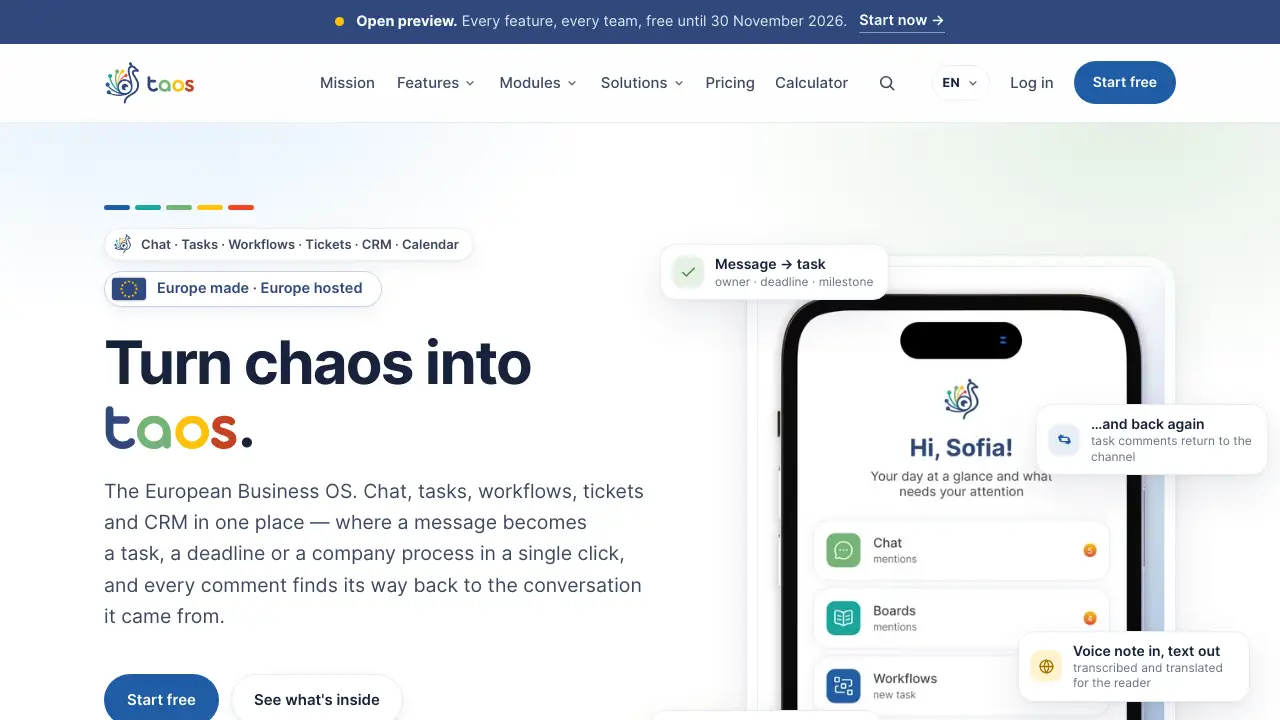
taos is a European Business OS that brings chat, tasks, workflows, tickets, and CRM into one app. It helps teams keep context instead of jumping between separate tools.
What is taos?
taos is an all-in-one business app and European Business OS designed for teams that want fewer subscriptions and clearer work context. It combines chat, task management, workflows, tickets, calendar, and CRM in one place. The core idea is simple: a message can become a task, a deadline, a calendar event, or a company process in one click. Comments on that task then return to the original conversation, so the reasoning stays attached to the work.
This matters because many teams already use four to eight separate tools for communication, projects, support, and client records. Those tools often lose context between modules. taos is built to reduce that fragmentation. It is also European by jurisdiction: the platform is EU made and EU hosted, with data kept in the European Economic Area. This can matter for law firms, auditors, R&D institutes, public bodies, and other organisations that need GDPR-aligned software. An open preview makes every feature free for every team until 30 November 2026, with no credit card required.
Key Features of taos
Conversation-to-task conversion
Turn any message into a task with an owner, deadline, and milestone without leaving the chat. Task comments sync back to the channel, so team collaboration stays connected to the original discussion.
Calm notifications by default
taos alerts users only where action is genuinely needed. Availability schedules, automatic Do Not Disturb during recurring meetings, and per-channel rules help reduce notification overload.
Multi-organisation inbox
Switch between clients, companies, or workspaces without logging out. Chat, tasks, boards, tickets, and CRM notifications arrive in one list, which is useful for agencies and multi-client teams.
European hosting and compliance
The platform is EU made and EU hosted, with workspace data staying in the European Economic Area. It references GDPR, the EU AI Act, the EU Data Act, and eIDAS, and can simplify NIS2 and DORA supply-chain evidence.
Boards and shared calendar
Urgent and one-off items move onto Kanban boards where priorities and statuses change quickly. Every task with a deadline appears in the shared calendar and syncs both ways with Google Workspace and Microsoft 365.
Workflows and SOPs
Turn repeatable procedures into workflow templates with predefined steps, relative deadlines, and responsible departments. This supports workflow automation and makes it clear who owns the next move.
Announcements and engagement
Post company announcements and track who has acknowledged them. Feedback Friday, kudos, surveys, and pulse surveys sit inside the channels teams already use. Managers can also track eNPS, satisfaction, and alignment over time.
CRM in development
The Business OS plan includes CRM, currently listed as in development. This points to a future customer relationship management layer inside the same European Business OS.
Use Cases for taos
Agencies and client service teams
Agencies often manage several clients at once. taos lets teams switch organisations without logging out and keeps every notification in one inbox.
Law firms, auditors, and accountants
These teams may need EU data residency and clear audit trails. taos supports European hosting and structured workflows, tickets, and task management.
Operations and project teams
Operations teams can use boards for urgent work and workflows for repeatable processes. Calendar sync helps deadlines stay visible without a second diary.
HR and internal communications
HR teams can post announcements, collect acknowledgements, run pulse surveys, and measure engagement. This makes culture part of the daily workspace rather than a separate add-on.
Public bodies and R&D institutes
European hosting and compliance references can help public bodies and research teams meet internal requirements. taos also simplifies evidence for NIS2 and DORA supply-chain reviews.
How to Use taos
- Start the free preview at taos.world. No credit card is required, and there is no user cap during the preview.
- Bring existing history with you. Migration is included on every plan, according to the product information.
- Create or join a workspace, then invite team members and set roles.
- Use chat as the starting point. Convert a message into a task, board card, calendar event, or workflow step.
- Configure notifications, availability, and Do Not Disturb rules so alerts match real working hours.
- After 30 November 2026, choose a plan or continue on the Free plan if the workspace fits its limits.
Target Audience for taos
- Agencies and consultancies managing multiple clients
- Law firms, auditors, and accounting teams
- Operations and project management teams
- HR and internal communications teams
- Public bodies and R&D institutes
- European teams that need EU hosted software and GDPR-aligned tools
Is taos Free?
Yes. The open preview makes every feature free for every team until 30 November 2026, with no credit card and no user cap. After the preview, the workspace moves to a paid plan or the Free plan.
| Plan | Price | Features |
|---|---|---|
| Free | €0 for up to 8 people | Threads, Boards up to 2, From message to work, User dashboard, Data migration |
| Workspace | €7 per person / month, billed yearly | Everything in Free, plus Workflows up to 3, Voice transcription 30 min / mo, Voice translation, Pulse Survey, Availability schedule |
| Business OS | €15 per person / month, billed yearly | Everything in Workspace, plus Workflows up to 8, Manager dashboard, Scheduled vacation, User roles, CRM in development |
Prices are net of VAT and billed yearly. The full plan comparison is available on the official pricing page.
taos's Pros and Cons
| Aspect | Pros | Cons |
|---|---|---|
| Pricing | Free preview until 30 November 2026; Free plan for up to 8 people; one subscription instead of several tools | Paid plans are per person; CRM is still in development |
| Features | Chat, tasks, workflows, tickets, calendar, and CRM in one app; message-to-task conversion; calendar sync | Microsoft Teams meeting creation is still in progress |
| Privacy | EU made and EU hosted; data in the EEA; GDPR, EU AI Act, EU Data Act, and eIDAS references | May be less suitable for teams already deeply tied to non-EU ecosystems |
| Usability | Calm notifications; multi-organisation inbox; migration included | New users may need time to adjust to the context-first workflow model |
Frequently Asked Questions about taos
What is taos?
taos is a European Business OS and all-in-one business app for chat, tasks, workflows, tickets, calendar, and CRM. It focuses on keeping context between conversations and execution.
Is taos free to use?
Yes, during the open preview every feature is free for every team until 30 November 2026. No credit card is required, and there is no user cap during that period.
Does taos replace Google Workspace or Microsoft 365?
No. taos is designed to work alongside Google Workspace and Microsoft 365. Mail, documents, and files stay where they are, while taos handles chat, tasks, workflows, tickets, and client records.
Can taos handle multiple companies or clients?
Yes. Users can switch organisation without logging out, and notifications from every workspace arrive in one list. This is useful for agencies, accountants, and law firms working with several clients.
Is taos suitable for GDPR-sensitive teams?
taos is EU made and EU hosted, with workspace data kept in the European Economic Area. It references GDPR, the EU AI Act, the EU Data Act, and eIDAS, which can help teams with strict compliance needs.
Does taos include CRM?
CRM is listed as in development on the Business OS plan. Teams can use chat, tasks, workflows, tickets, and calendar features while the CRM layer develops.
taos Tags
taos, European Business OS, all-in-one business app, chat tasks workflows tickets CRM, EU hosted software, GDPR compliant team app, team collaboration software, task management app, workflow automation, project management with calendar sync, multi-organisation inbox, CRM in development