Introduction
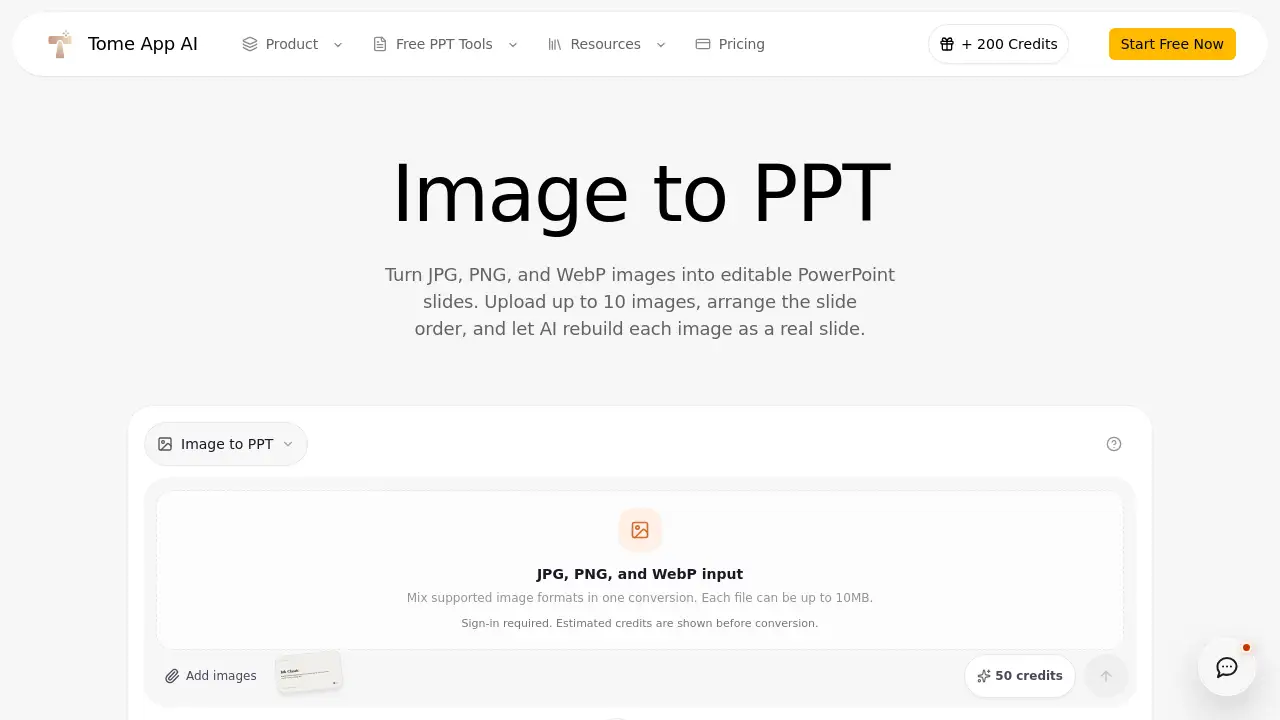
TomeApp Image to PPT Converter helps users turn static image files into editable PowerPoint slides. Instead of pasting screenshots into a deck, this image to PPT tool rebuilds each image as a real slide. It supports JPG, PNG, and WebP images and lets users arrange the slide order before generating a PowerPoint deck.
What is TomeApp Image to PPT Converter?
TomeApp Image to PPT Converter is an AI-powered online tool that converts image-based designs into editable presentations. It solves the problem of manually recreating slides from screenshots or pasted pictures. Users upload up to 10 images, set their preferred slide order, and let AI rebuild visible text, cards, tables, simple charts, colors, and hierarchy as genuine slide elements. The result is an editable PowerPoint file, not a full-page image. This matters for anyone who needs to update content quickly, maintain branding, or adapt a visual design into a presentation format.
Key Features of TomeApp Image to PPT Converter
JPG, PNG, and WebP Support
TomeApp Image to PPT Converter accepts JPG, PNG, and WebP files. Users can mix supported formats in one conversion, and each file can be up to 10MB, which makes it easy to bring in design exports and screenshots.
Drag-to-Order Workflow
Users can drag images to set the slide order before generating the deck. One source image becomes one slide, so the final sequence follows the intended presentation flow.
AI Editable Reconstruction
Instead of inserting a full-page screenshot, the tool uses AI to rebuild visible elements. Text, cards, tables, simple charts, colors, and hierarchy become editable slide components, giving users a working PowerPoint file after conversion.
Review and Export
After conversion, users can review the generated HTML slides inside the workspace, make edits, and then export the result as a PowerPoint file. This completes the workflow from static image to editable presentation.
Use Cases for TomeApp Image to PPT Converter
People use this image to PPT converter in several common situations.
Rebuilding Screenshot-Based Decks
People who receive slides as images can convert images into editable slides and adjust outdated content without starting from scratch.
Turning Design Mockups into Client Presentations
Designers can export UI mockups, infographics, or wireframes as images and use TomeApp Image to PPT Converter to create a slide deck that clients can further edit.
Adapting Visual Documents for Training
Training teams can turn image-based guides, charts, or tables into editable PowerPoint slides and add new notes or directions for learners.
Converting Infographics into Slides
Users can take a long infographic image and transform it into an editable PowerPoint slide or a multi-slide summary. The AI reconstructs visible headings, text, and layout, so the content remains easy to update.
How to Use TomeApp Image to PPT Converter
Using TomeApp Image to PPT Converter is straightforward:
- Go to the image to PPT tool page.
- Upload up to 10 supported image files in JPG, PNG, or WebP format.
- Drag the uploaded images to arrange the slide order.
- Let AI turn the images into editable PowerPoint slides.
- Review the generated HTML slides, edit if needed, and export the final result as a PowerPoint file.
Target Audience for TomeApp Image to PPT Converter
- Designers who need to turn visual concepts into PowerPoint versions
- Marketers converting ad banners or social media graphics into pitch decks
- Business professionals recreating slide decks from image screenshots
- Trainers and educators building courses from visual reference materials
- Students preparing presentations from images or exported slides
- Content creators repurposing infographics into shareable decks
Is TomeApp Image to PPT Converter Free?
Pricing for TomeApp Image to PPT Converter is not clearly listed in the available reference content. The product page focuses on the conversion workflow and feature details, but it does not include a complete pricing table. Users who want to know whether this image to PPT converter is free, has a trial, or offers paid plans should visit the official TomeApp website for current pricing information.
TomeApp Image to PPT Converter's Pros and Cons
| Aspect | Pros | Cons |
|---|---|---|
| File compatibility | Supports JPG, PNG, and WebP images up to 10MB | Each conversion is limited to 10 images |
| Output | Creates editable PowerPoint slides, not full-page screenshots | Visual detail depends on AI reconstruction quality |
| Workflow | Simple upload, drag-to-order, and export process | No clear public pricing details |
| Editing | Users can review generated HTML slides before export | Slides may need extra editing after export |
Frequently Asked Questions about TomeApp Image to PPT Converter
Can TomeApp Image to PPT Converter handle different image formats?
Yes. TomeApp Image to PPT Converter supports JPG, PNG, and WebP files, and users can mix these formats in one conversion. Each file can be up to 10MB.
Will the text in the PowerPoint slides be editable?
According to the product description, TomeApp uses AI to rebuild visible text, cards, tables, simple charts, colors, and hierarchy as slide elements. This means the output is designed to be editable, not a full-page screenshot.
How many images can I convert at once?
TomeApp Image to PPT Converter lets users upload up to 10 images per conversion. Each source image becomes one slide in the final PowerPoint file.
Can I change the slide order before converting?
Yes. The drag-to-order workflow allows users to arrange the slide sequence before generation. This is useful for creating a clean presentation flow.
What file can I export after editing?
After converting and reviewing the generated HTML slides in the workspace, users can export the result as a PowerPoint file. This gives a file that can be opened in PowerPoint and further edited.
Do I need design skills to use this image to PPT converter?
No. The tool is designed around a simple process: upload images, adjust order, let AI reconstruct the slides, and export a PowerPoint file. Basic computer skills are enough.
TomeApp Image to PPT Converter Tags
TomeApp Image to PPT Converter, image to PPT, convert images into editable slides, JPG to PowerPoint, PNG to PPT, WebP to PowerPoint, AI presentation converter, editable PowerPoint slides, drag-to-order slide workflow, PowerPoint from images, image to presentation, TomeApp AI