Introduction
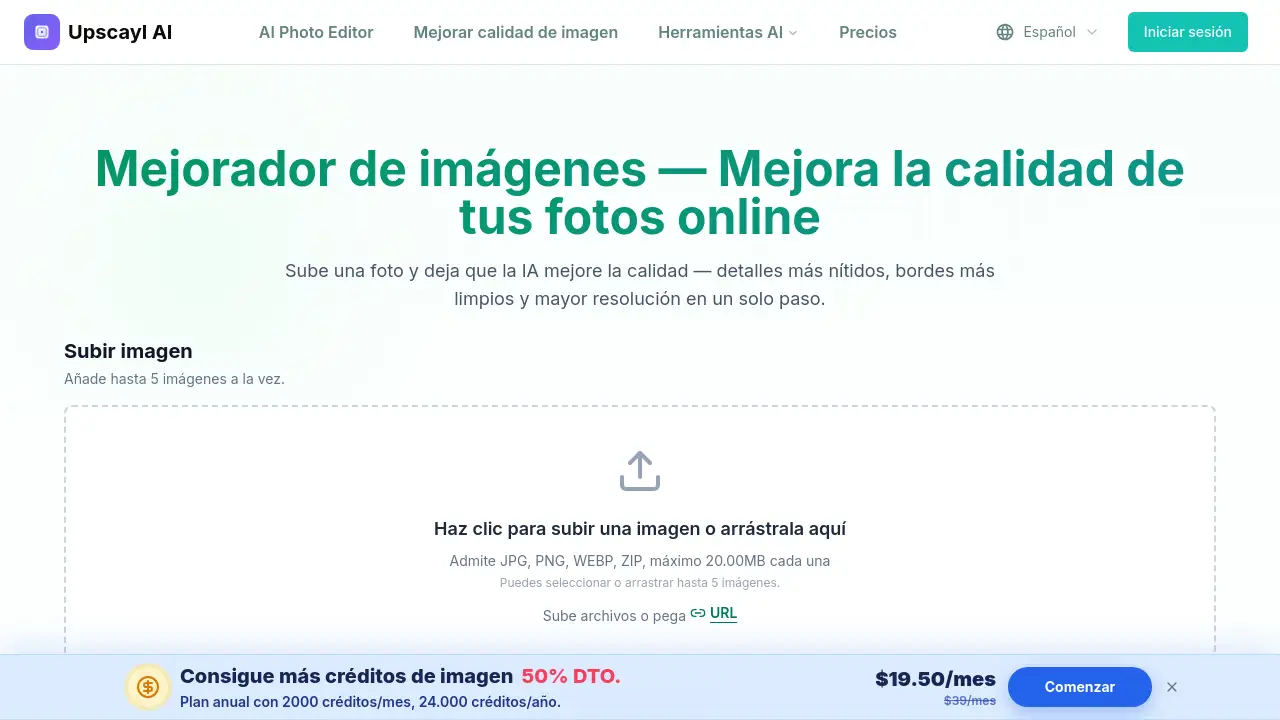
mejorar calidad de imagen is an online AI image enhancer. It helps users fix blurry photos, sharpen details, and increase resolution quickly in a browser.
What is mejorar calidad de imagen?
mejorar calidad de imagen is a web-based tool that uses artificial intelligence to improve photo quality automatically. The Spanish name means “improve image quality,” and that is exactly what the tool does. Instead of manually editing images with complex software, users upload a photo and the AI reconstructs missing details, reduces blur, and creates a sharper, higher-resolution version.
The tool solves a common problem: many photos look soft, pixelated, or blurry when enlarged. This is especially common with old scanned photos, cropped images, or pictures taken on older phones. An AI image enhancer can fix this by adding realistic detail and improving clarity. Anyone who needs to upscale image quality or clean up photos for printing, social media, or e-commerce can use it without learning professional editing skills.
Because it runs in a browser, there is no software to install. Users can upload JPG, PNG, WEBP, or ZIP files, choose an output scale, and download a new version. This makes it a convenient option for anyone searching for a fast online image enhancer.
Key Features of mejorar calidad de imagen
AI Detail Reconstruction
The AI fills in missing or smoothed details in low-resolution images. Instead of just sharpening an image with a filter, it rebuilds genuine-looking textures and edges.
Resolution Scaling up to 4K
Users can increase resolution by selecting 1×, 2×, 4×, 6×, or 8× scaling. This is useful for anyone who wants to upscale image quality for large screens or prints while avoiding a pixelated look.
Blur and Softness Reduction
The tool analyzes unfocused areas, motion blur, and lens softness, then sharpens them. This helps fix blurry photos and makes borders and fine lines clearer.
Portrait and Face Enhancement
For portraits, the AI sharpens eyes, softens skin noise, and defines facial features naturally. It works well for selfies, group photos, and close-ups that look soft or compressed.
Old Photo Restoration
Scanned images and older digital photos often have grain, compression artifacts, and lost sharpness. The AI reduces noise and restores clarity while preserving the original character of the photo.
Browser-Based Enhancement
Everything happens in a browser on any modern device. There is no need to install software or learn complicated settings, making it a simple photo quality enhancer for everyday users.
Batch Upload
Users can add up to five images at a time, each up to 20 MB. This speeds up work for small sets of product photos or multiple portrait shots.
Use Cases for mejorar calidad de imagen
E-Commerce Product Photos
Sellers can improve photo quality for product listings and online stores. Sharper images with cleaner edges make products look more professional and help customers see labels, packaging, and textures.
Portrait Photography
Photographers and social media users can enhance portraits with the face enhancement option. Eyes look clearer, skin texture remains natural, and hair details stand out more.
Restoring Old Family Photos
Vintage scans and old digital photos can be improved for family archives. The AI reduces grain, removes compression artifacts, and recovers sharpness without changing the nostalgic look.
Scanned Documents and Text
Text-heavy images and scanned documents become more readable. The tool sharpens character edges and softness, making it useful for document cleanup and digitization.
Social Media Content
Content creators can upscale image resolution before posting on social platforms. Sharper visuals help images stand out in feeds, especially when original files are small or heavily compressed.
How to Use mejorar calidad de imagen
Using this tool takes only a few steps:
- Open the image enhancer page and upload a JPG, PNG, WEBP, or ZIP file. Drag and drop or click to upload up to five images.
- Choose the image type, output resolution, and scale. To increase resolution, choose a higher scale. For portraits, enable face enhancement.
- Select an output format, such as PNG or JPG.
- Wait a few seconds while the AI processes and sharpens the image.
- Preview the improved result side by side with the original, then download the high-resolution version.
The main goal is to make it easy for anyone to improve image quality with AI, even with no editing experience. It is also a simple way to upscale image quality with AI directly from a browser.
Target Audience for mejorar calidad de imagen
- E-commerce sellers and online store owners
- Social media content creators and influencers
- Photographers looking to quickly fix blurry shots
- Families restoring old scanned photos
- Professionals who need to clean up document scans
- Anyone who wants to upscale image quality without paid desktop software
Is mejorar calidad de imagen Free?
This AI image enhancer is available online, and new accounts receive trial credits to test the service. Each successfully enhanced image uses one credit. If the process fails, no credit is charged. An account is required to process images and download results.
| Plan | Price | Features |
|---|---|---|
| Free trial | $0 | Trial credits for new accounts; works with JPG, PNG, WEBP; each successful image costs 1 credit |
| Paid plans | See official website | Additional credits for more uploads and regular use |
Pricing details for paid plans are not listed in the available product information. Users should check the official website for current prices and credit options.
mejorar calidad de imagen: Pros and Cons
| Aspect | Pros | Cons |
|---|---|---|
| Ease of Use | No software installation; simple browser-based workflow | Requires internet connection and an account |
| Image Quality | AI reconstructs details and sharpens blurry images | Very extreme blur or motion blur may still have limits |
| Resolution | Supports up to 8× scaling and 4K output | Each successful image uses one credit, so free use is limited |
| Workflow | Batch upload up to 5 images; no watermark on results | File size limit of 20 MB per image |
Frequently Asked Questions about mejorar calidad de imagen
What is an AI image enhancer?
An AI image enhancer is a tool that uses artificial intelligence to improve photo quality automatically. It can sharpen blurred areas, increase resolution, reduce noise, and restore lost details without manual editing.
Can this tool fix blurry photos?
Yes. The AI identifies blurred or soft areas and sharpens them. Mild to moderate blur improves well, while severe motion blur or extreme out-of-focus shots may have limits.
Does it really increase resolution to 4K?
Yes. The tool supports resolution scaling up to 8×, with output settings suitable for 4K screens and large prints. Results depend on how much useful detail exists in the original image.
Is there a free trial?
New accounts receive trial credits to test the tool. Each successful image uses one credit, and failed attempts do not consume credits. Check the official site for the latest free trial terms.
Do enhanced images have a watermark?
No. Downloaded results do not include watermarks, which makes the tool useful for professional images, product listings, and personal archives.
Can I use it on my phone?
Yes. The tool works in any modern browser, including Safari and Chrome on iOS and Android. Users can upload, improve, and download images directly from their phone.
mejorar calidad de imagen Tags
mejorar calidad de imagen, AI image enhancer, upscale image online, fix blurry photos, increase resolution, photo quality enhancer, 4K image enhancer, enhance old photos, portrait enhancer, free image enhancer, online photo sharpener, browser-based photo enhancer