Introduction
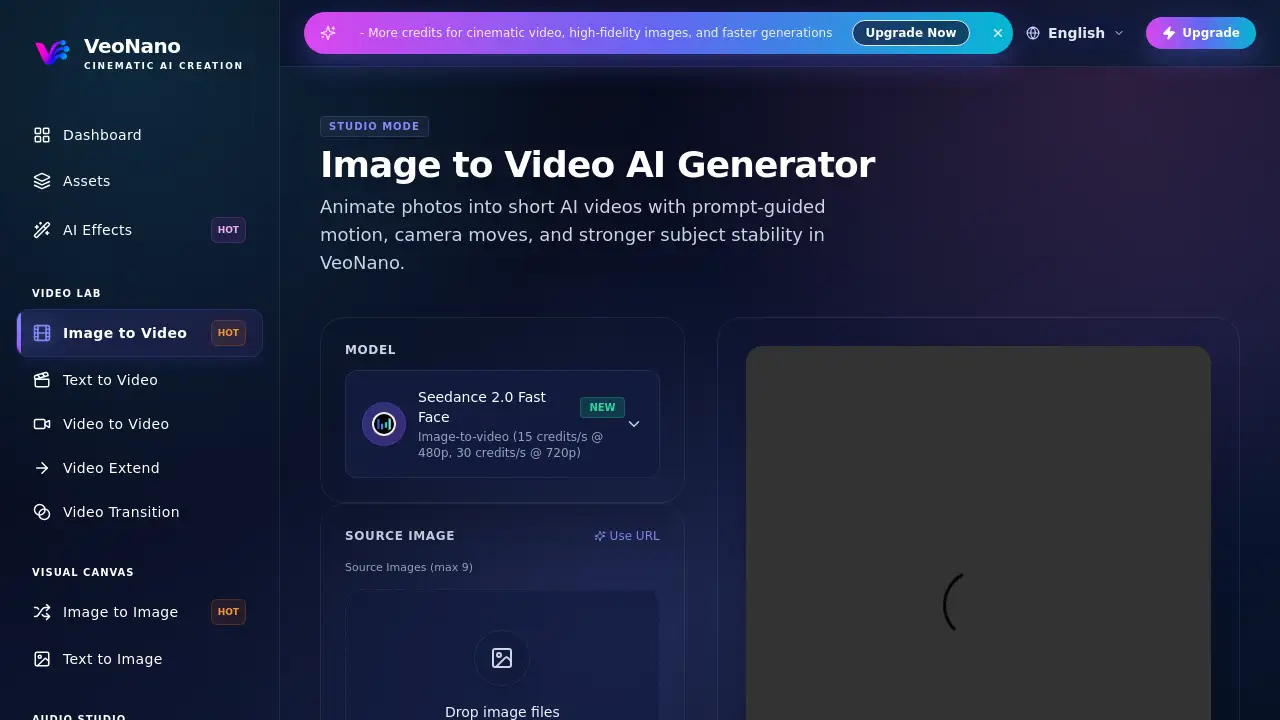
VeoNano Image to Video is an AI video generator that turns still images into short, shareable clips. This image to video tool supports prompt-guided motion, camera movement, and stronger subject stability. It makes AI video creation from a single photo fast and simple. Content creators, marketers, and designers can use this image to video AI generator without advanced editing skills.
What is VeoNano Image to Video?
VeoNano Image to Video is a browser-based image to video feature inside the VeoNano creative suite. It solves the problem of turning static photos into short animated videos without complex editing software. The tool uses an image to video AI generator called Seedance 2.0 to understand the original image, apply motion, and keep the subject stable. This matters because many content workflows need fast, polished video assets. Instead of shooting new footage, users upload an image, type a prompt, and let the AI generate the clip. It is suitable for creators, marketing teams, e-commerce sellers, and agencies that want a fast photo to video process.
Key Features of VeoNano Image to Video
Prompt-Guided Motion
The image to video model reads natural language prompts and adds movement to the original photo. Users can describe a pan, zoom, dolly, or subtle subject motion without manual keyframing. This AI video generator makes the image to video workflow fast and beginner-friendly.
Camera Movement Controls
Users can shape how the virtual camera behaves in the image to video output. Simple instructions such as "zoom in slowly" or "pan right" help the AI video generator create cinematic camera moves. This adds production value to short clips.
Stronger Subject Stability
VeoNano's image to video AI generator keeps the main subject consistent across frames. This AI video generator reduces flickering and unwanted changes, making clips look cleaner for social media and advertising.
Multiple Source Image Support
Users can upload up to 9 source images and choose the primary reference for image to video creation. This is useful for batch ideas, variations, or short sequences. Batch generation is available on select plans.
Reference Video and Audio
The image to video tool accepts up to 3 reference videos and 3 reference audios, each up to 15 seconds total. This helps the AI video generator guide motion or mood beyond the prompt. It is a helpful addition for AI video generation projects that need specific timing.
Duration and Resolution Options
Users can choose a 5-second image to video clip by default and adjust the aspect ratio, including 16:9. The standard resolution is 480p, with HD options on select plans. This AI video generator uses 15 credits per second at 480p and 30 credits per second at 720p.
Seedance 2.0 Model with Fast Face
The image to video tool uses Seedance 2.0, with a Fast Face option for face-focused shots. This model option makes the AI video generator more stable when animating portraits or people.
Use Cases for VeoNano Image to Video
Social Media Clips
Creators can turn a product photo or portrait into a short animated post. The image to video AI generator adds subtle motion, making the content more engaging on Instagram, TikTok, or YouTube Shorts.
Ad Creatives and Marketing
Marketers can animate a static campaign image without a full production shoot. The image to video approach helps create quick variations for A/B testing, banners, and paid social ads. This AI video generator is especially useful for testing multiple versions quickly.
Storyboards and Pitch Decks
Designers can transform concept art and still frames into short image to video previews. This helps explain a scene, camera move, or visual idea before full production. An AI video generator can make these previews in minutes.
Product Demonstrations
E-commerce sellers can add gentle movement to product images to highlight texture, angle, or functionality. Simple prompts and camera moves make image to video conversion useful for online stores.
How to Use VeoNano Image to Video
- Upload a source image (JPG, PNG, WebP, or HEIC). The image to video tool accepts up to 9 images and uses the first one as the primary reference.
- Write a prompt that describes the motion, camera movement, and style. The AI video generator can also work without a prompt.
- Choose duration, aspect ratio, and resolution. Defaults are 5 seconds, 16:9, and 480p.
- Add optional reference video or audio URLs if you want to guide rhythm, mood, or camera behavior.
- Click Generate Video and wait for the clip. This image to video process is simple enough for both beginners and professionals.
Target Audience for VeoNano Image to Video
- Content creators and social media managers
- Digital marketers and ad agencies
- E-commerce sellers and online store owners
- Video editors and motion designers
- Product managers and startup teams
- Anyone who needs fast image to video AI generation
Is VeoNano Image to Video Free?
VeoNano Image to Video includes a free credit system. New users can start free and use credits to generate clips. Paid plans provide more credits, faster queues, higher resolutions, and longer outputs. The AI video generator also works with text to video, video to video, and text to image tools in the same workspace. For exact image to video pricing and plan limits, check the official VeoNano pricing page.
| Plan | Price | Features |
|---|---|---|
| Free | $0 | Starting credits, standard image to video generation, access to Seedance 2.0 |
| Pro | Paid plan | More credits, faster queues, higher resolutions, longer image to video clips |
VeoNano Image to Video's Pros and Cons
| Aspect | Pros | Cons |
|---|---|---|
| Ease of use | Simple upload, prompt, and generate image to video workflow | Some users may need practice writing motion prompts |
| Output quality | Stronger subject stability, cinematic camera moves | Short default clip length |
| Pricing | Free starting credits, flexible upgrade path | Higher resolutions and longer clips cost more credits |
| Model options | Seedance 2.0 with Fast Face and optional references | Reference video/audio setup requires public URLs |
| Batch support | Up to 9 source images, batch generation on select plans | Not available on all plans |
Frequently Asked Questions about VeoNano Image to Video
What image formats does VeoNano Image to Video support?
The AI video generator supports JPG, PNG, WebP, and HEIC. For best results, images should be at least 512x512 pixels.
How long can the generated video be?
The standard image to video output is a short clip, usually 5 seconds. Longer durations may be available on select plans.
Can I animate a photo without writing a prompt?
Yes. Seedance 2.0 can generate an image to video clip with or without a prompt. Adding a simple prompt, however, gives more control over camera movement and subject motion.
Can I convert multiple images to video?
Batch generation is supported on select plans. Users can upload multiple images and generate image to video clips sequentially, using one primary reference image for each clip.
Is image to video AI free?
The tool offers free starting credits. Paid plans include more credits, faster queues, higher resolutions, and longer image to video generations. The AI video generator is free to start with credits.
What does VeoNano do about content safety?
VeoNano tries to preserve creative flexibility while enforcing its content policy. Illegal content is prohibited, and users must have rights to any content they upload or reference.
VeoNano Image to Video Tags
VeoNano Image to Video, image to video AI generator, animate photos, photo to video, AI video generator, prompt-guided motion, camera movement, subject stability, text to video, video to video, AI video creation, cinematic image animation