Introduction
Denser AI: a no-code website chatbot for quick setup.
What is Denser AI?
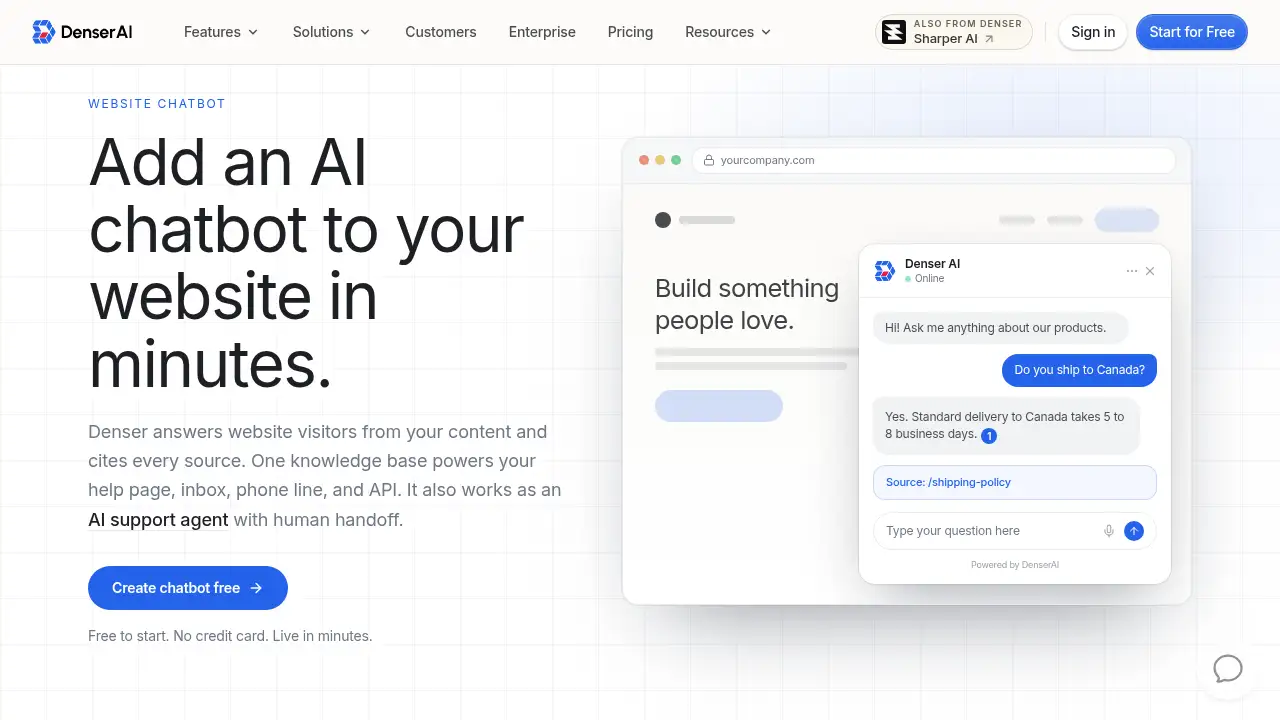
Denser AI is a website chatbot platform for adding an AI chatbot for website visitors in about five minutes. It connects to website pages, PDFs, Word files, PowerPoint decks, and plain text, then answers from that approved knowledge base. Teams use the website chatbot to handle common questions, capture qualified leads, and route harder conversations to people. Its main difference is grounded answering: responses can link to the exact source passage, so visitors and staff can check why an answer is trustworthy. Denser AI also works as an AI support agent with human handoff. One knowledge base can power a website chatbot, help page, inbox, phone line, and API. This makes it a practical website chatbot tool for support, sales, and documentation teams.
Key Features of Denser AI
No-Code Website Chatbot Setup
Launch a website chatbot by pasting a site URL, testing answers in a live preview, and copying one embed snippet. The no-code setup also supports WordPress, Shopify, Wix, Squarespace, Webflow, or any HTML page.
Cited Answers and Knowledge-Gap Reporting
Deliver grounded answers that link to the source passage behind each response. Review unresolved questions and conflicting sources to improve the content that powers the website chatbot.
Lead Capture Inside Conversations
Turn on a lead form to collect names, emails, and custom fields during a chat. This helps a website chatbot qualify intent and support follow-up without sending visitors to a separate form.
Human Handoff and Helpdesk Workflow
Offer live takeover when a teammate is available or create a helpdesk ticket with the transcript and visitor context. The AI support agent can hand off complex questions without making customers repeat themselves.
Actions for Booking, APIs, and Slack
Let the website chatbot book Cal.com meetings, call approved APIs, show product or order cards, and post requests to Slack. Each action can be tested in a test chat before visitors see it.
Multi-Channel Website Chatbot Deployment
Deploy the same website chatbot to site chat, a hosted help page, email, phone, API, WordPress, Shopify, Slack, Telegram, and WhatsApp. Every channel uses the same knowledge base and citations.
Brand and Scale Controls
Customize the widget name, logo, colors, and greeting to match the site. A single website chatbot can index hundreds of thousands of pages and up to 50 GB of content, according to Denser AI.
Use Cases for Denser AI
Customer Support
Answer policy, product, and troubleshooting questions before they become tickets. A website chatbot can reduce repetitive support work while keeping citations available for review.
Lead Qualification
Answer buying questions first, then collect details or book a meeting when intent is clear. Lead capture inside the website chatbot helps sales teams follow up with better context.
Product Documentation
Give users a conversational route through technical guides, release notes, and help content. The AI chatbot for website documentation can point to the exact passage behind an answer.
Large Content Libraries
Search across website pages and uploaded files without making visitors guess the right keyword. This use case fits teams with broad help centers, policy libraries, or product catalogs.
Sales and Demo Booking
Let visitors ask about plans, availability, or fit, then book a demo inside the chat. The website chatbot can use a Cal.com action to show open times without leaving the page.
How to Use Denser AI
- Connect sources: Paste the site URL so Denser AI crawls and indexes pages, then add PDFs, Word, PowerPoint, or plain text files if needed.
- Test the website chatbot: Ask real questions in the dashboard preview and review the citation behind each answer. Adjust the prompt, theme, and lead form before launch.
- Configure actions: Decide when the chatbot can book meetings, call an API, show cards, notify Slack, or hand off to a person.
- Deploy the chatbot: Copy one snippet for the website widget or use an iframe, React component, REST API, or supported integration.
- Review and improve: Use knowledge-gap reporting to find unresolved questions and update the content that powers future answers.
Target Audience for Denser AI
- Small and midsize businesses that need a fast website chatbot without code.
- Customer support teams that want fewer repetitive tickets and clear human handoff.
- SaaS, documentation, and help center teams with large content libraries.
- Sales teams that need lead capture and in-chat meeting booking.
- Shopify stores looking for product search, cart actions, and order status support.
- Agencies and enterprises that deploy one AI support agent across multiple channels.
Is Denser AI Free?
Yes. Denser AI has a free plan with 50 queries per month and 100 pages or 50 MB per bot. Paid plans are billed monthly, and yearly billing saves 20%.
| Plan | Price | Features |
|---|---|---|
| Free | $0/month | 50 queries/month; 100 pages or 50 MB per bot |
| Starter | $39/month | 1,500 queries/month; 100 pages or 50 MB per bot |
| Standard | $119/month | 7,500 queries/month; 2,000 pages or 1 GB per bot |
| Business | $399/month | 15,000 queries/month; 10,000 pages or 5 GB per bot |
| Enterprise | $899/month | Listed in Denser AI FAQ; check official pricing for current limits |
Denser AI says users are not charged per answer or per resolution. A free website chatbot tool is also available to build a chatbot from a URL before signing up. For current pricing, the official Denser AI pricing page is the best source.
Denser AI's Pros and Cons
| Aspect | Pros | Cons |
|---|---|---|
| Pricing | Free plan and clear monthly tiers; no per-answer charge stated | Lower tiers have limited queries and page or file capacity |
| Features | Cited answers, lead capture, human handoff, actions, and multi-channel deployment | Advanced API and phone setups may need technical help |
| Setup | No-code website chatbot snippet; live preview before launch | Brand and action settings take some initial tuning |
| Content | Handles website pages plus PDFs, Word, PowerPoint, and text | Answer quality depends on approved source content |
| Support use | AI support agent workflow with transcripts and shared queue | Complex escalations still need staffed teams |
Frequently Asked Questions about Denser AI
Is Denser AI free to try?
Yes. The Free plan supports one website chatbot with 50 queries per month and 100 pages or 50 MB per bot. A free website chatbot tool can also build a chatbot from a URL before sign-up.
How does the website chatbot avoid wrong answers?
Denser AI uses retrieval-augmented generation. It finds relevant passages in approved content first, answers from them, and links the citation. If the answer is missing, the website chatbot can say so and route the question instead of guessing.
Can Denser AI capture leads?
Yes. The lead form can collect a visitor’s name, email, and custom fields during a conversation. Teams can export the data or sync it to a CRM, according to the product information.
How do I add the AI chatbot for website use?
Paste the site URL, let Denser AI crawl and index the content, test answers in the dashboard, then copy one embed snippet. The website chatbot works with WordPress, Shopify, Wix, Squarespace, Webflow, or any HTML page.
Can the chatbot hand off to a human?
Yes. Denser AI can offer live takeover or create a helpdesk ticket with the transcript and visitor context. The AI support agent can also post call-back requests to Slack.
Which channels can Denser AI support?
The same knowledge base can power website chat, a hosted help page, email, phone, API, WordPress, Shopify, Slack, Telegram, and WhatsApp. This makes it a flexible AI chatbot for website and multi-channel support.
Denser AI Tags
AI chatbot for website, website chatbot, no-code website chatbot, website chatbot tool, AI support agent, lead capture chatbot, cited answers, customer support chatbot, Shopify AI chatbot, multi-channel chatbot, chatbot for website, Denser AI